In smart plot, the plan set tab has no templates displaying. It shows the templates in my files but nothing when I click the drop down tab. Any help will be appreciated thank you.
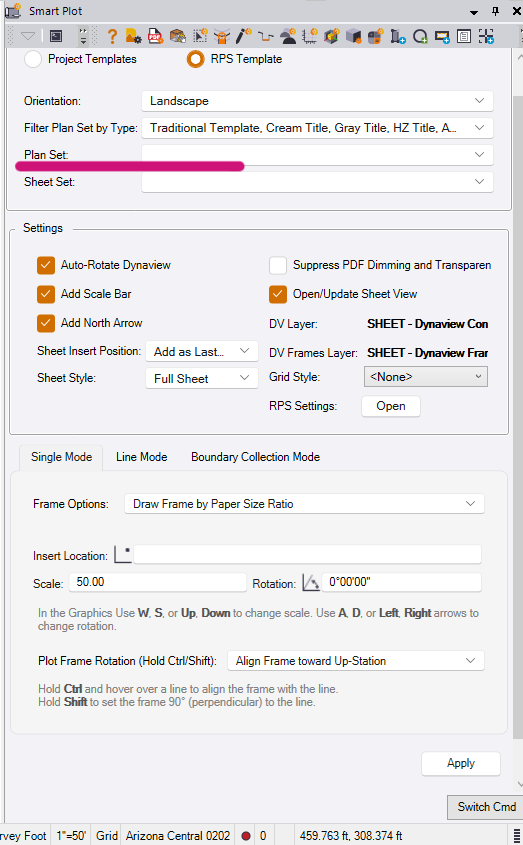
I noticed similar behavior when I only had one existing plan set in my TBC project and was using my Project Template instead of the RPS Template. The Plan Set drop down was blank until I created a second plan set, which forced Smart Plot to populate (apparently).
Do you have any vcl templates in your RPS Settings folder (check your actual path in RPS Settings): C:\ProgramData\Trimble\Trimble Business Center\RPSSmartPlot\Templates\Feet\Landscape
Yeah i checked, the vcl templates are in the rps folder. Still nothing popping up. Will continue to find a fix, thanks though.
@Tevin_Toehe There are some cases where RPS Templates are not installed correctly, if your computer has IT security protections. We may need to manually install them for the time being.
I will give you a call tomorrow to see if that is case
We fixed it. It was in the wrong location in my folders. thank you
1 Like
I am having the same issue where the RPS templates are missing !
My apologies for that. It appears to be an issue with IT-protected computers where some files are not being installed/blocked . We are working on a fix. In the meantime, we can copy templates manually. I have attached the ZIP file below.
Steps:
-
Download “RPSCommandData.zip”
-
Unzip the file and locate the folder “RPSSmartPlot” inside the extracted folder
-
Open File Explorer
-
Go to:
-
This PC
-
then open Documents (this may be under OneDrive if you use it)
-
open the folder Rockpile Solutions
-
then open Trimble Business Center
Note: The location may look different if your RPSSettings folder was redirected or changed in your settings.
On most computers, the full path looks like this:
C:\Users\YOURUSERNAME\Documents\Rockpile Solutions\Trimble Business Center\ -
-
If you already have a folder named RPSSmartPlot, delete it
-
Copy the RPSSmartPlot folder from the unzipped files into that location
After completing these steps, please close and reopen TBC.
Here is the zip file:
RPSCommandData.zip (8.4 MB)
Here is the video :