When I am building a surface, I sometimes want to add a single isolated point instead of drawing a breakline (usually for things like spot grades that are off by themselves or catch basin rims within pond areas). I used to be able to do this with a zero length/single node linestring, but since updating to TBC 2025.20, any zero length linestrings I create or edit immediately disappear upon exiting the linestring editor. I’m not sure if this is a bug or intended; I wasn’t able to find anything about it in the release notes, and my coworkers are seeing the same behavior.
I am wondering if there are any other quick and simple ways to create an isolated point I can add to a surface (and edit later if necessary). I prefer not to use TBC’s point objects because of the extra visual clutter the point ID and elevation add when the layer is visible; I know TBC supports CAD point objects that don’t show extra information in the plan/3D views, but I am not sure if there is any command for creating one within TBC. I can still technically create zero length linestrings with Rockpile’s Quick Line command (creating a two-node line and undoing once leaves a single node), but they will still disappear if edited.
Thank you!
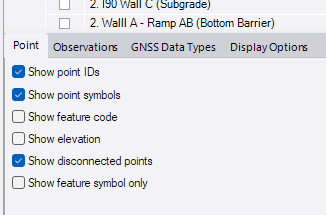
personally, i would use the points. Then use the View Filter Manager to handle the point data. I have a layer specific to OG and DES surface points and a quick toggle handles the clutter. Better yet, the Point Tab at the bottom of the VFW will handle display project wide. you can also use the CAD group to minimize the visuals.
It seems zero length lines would be hell when running Project Clean-up
1 Like
I echo Nates comment below - I would also use points and just turn off the settings at the base of the View Filter manager to not show the Point ID, Code or Elevation values.
TBC has always had a zero length issue ie if two points are closer than a small distance then the object can get eliminated at some point by TBC, and a point is the best way to create a discrete point location. They may have changed how that is cleaned up in a release, however I would say typically we are trying to eliminate zero length lines from CAD rather than create them in TBC, I have always used points to do what you areasking for.
There is no easy way to create a CAD point - the RPS Smart Point Manager will create Grid or Grid only points (you want grid only) and that will do what you want, and providing you diont need some point labels and not others you can removve all the labeling in the View Filter manager.
Does this help or is there some other clutter that we are not seeing / thinking about here?
Alan
1 Like
Robert Fox, Antonio Banderas? Why are you using multiple names asking similar questions on different forums?
@nate_doyle @alan.sharp Thank you for the tips, this solves it for me! I always have my View Filter Manager tabbed over to Display Options, so I hadn’t realized those Point options were there; I had been looking in the Project Settings for controls on the point display. It makes sense that zero length lines are not optimal/desirable in the long run, it’s just something I had gotten used to using. With our workflow, after the initial cleanup on the data is done, if we have to run Project Cleanup again it’s on specific layers rather than the entire project, so those lines getting deleted in a cleanup pass was never really a concern. Being able to hide the extra info display on the TBC points makes it much easier for me to use them in modeling; thank you!
Erik (sorry, I am only able to @ two users in a post currently): I am not sure about Antonio Banderas, but I do see the post by Robert Fox you’re talking about on the TBC Community forum. It looks like we are both having an issue with not being able to create zero length linestrings any more, but we use them for different things (I use mine in modeling). This is the only forum I personally have posted on; I apologize for any confusion!
1 Like