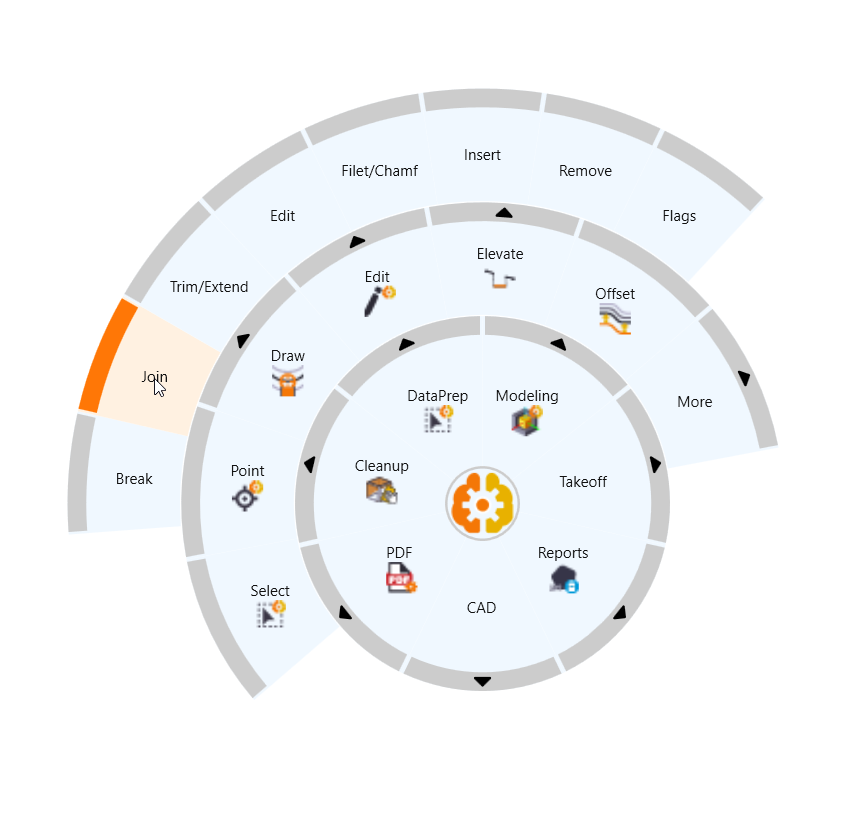
At Rockpile we are moving our Menu Controls over to the RPS Navigate command (Radial on Cursor Menu) as shown below, however we understand that it can take time to transition over to the radial menu, so we have ceated a 2026.1 version of the RPS Menu Configuration.
Note: On this menu we have removed all “Duplicate or Overlapping” functionality to help drive RPS users to the correct RPS commands. For example you will not find commands like Create Surface, Surface Edge Breakline, trim Surface Edge, Add and remove Surface Boundaries as those functions can all be found in RPS Smart Model.
If you want all standard TBC menus we recommend that you restore the TBC Default menus and then run RPS Menu manager from the command pane to reinstate our command library menus to the TBC Default Menus. You can then turn On / Off and menus that you do not need like Monitoring, tunnels, Drilling, Piling, Survey, Phiotogrammetry etc using Support - Set ribbon Tabs.
Once you have the menus as you want them, we recommend using Support - Customize Ribbon, and Export to export a copy of your Menu Setup and store it in \Documents\TBC master\Menus\ so that you have it for future use.
We have found that to train yourself to use the available RPS commands where they add to or improve TBC standard workflows, it is easier / faster to make the change if the traditional TBC commands are not so easy to access.
RPS Menu Configuration 2026.1 Download
RPS Custom Menu v2026.1.bin (3.1 MB)