Does anybody know of a way to set your 3D view in specific cardinal directions or elevation directions like you would in AutoCAD with the little block in the upper right-hand corner so you can view the right side of the model, left side, whatever?
Specifically my use case right now is I have footing line work that came out of CAD solids so I have a lot of vertical lines connecting top and bottom footing. I found if I highly exaggerate the 3D view I can easily select all those vertical lines between top and bottom footing but rotating the view to get to one of those specific angles is a little bit cumbersome.
If I’m following you correctly;
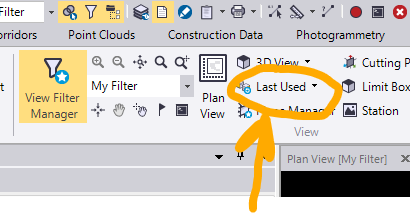
Home Tab>Last Used Drop Down>Front/back/top….
2 Likes
3D View Settings and 3D View Presets do this.
If you use our Explode Solids command you can separate Top, Bottom and Sides of Solids into three different layers in a single step
Alan
1 Like
What if you can get the solids to come into TBC? I had to explode everything in C3D…
Thanks for the note on the 3D views.
Use a free license of Trimble Connect - upload the DWG - open it in Connect and then export to TRB. Bring the TRB file into TBC
Now ise our Explode Solids to break the data out onto the parts I mentioned in last email
1 Like