This is from a post I made on LinkedIn and I thought someone might find it useful here.
TBC Quick Tip: Smart Coordinate Scroll
Thought I’d share this tip for quickly checking model elevations when you’re referencing civil and arch plans.
Modeling to the correct slab/pad elevation is crucial and can lead to costly mistakes if done incorrectly. It can be frustrating when arch slab elevations are given as a delta to a reference elevation, and civil plan elevations are given in reference to a datum eg. NAVD 88. This can require some quick math in your head, adding or subtracting from the civil’s reference elevation. And that can lead to errors in the model if you mess up the calculation, which is further complicated when the arch plans are given in feet inches instead of decimal feet.
For example, if the civil plans give the base elevation as 35.05 and there is a raised portion of the slab given as +1’ 3/4". You would need to convert the 1’ 3/4" to decimal feet then add it to 35.05 to find the correct slab elevation.
Additionally, the civil and arch plans can have errors where they don’t correspond. This can not only help catch errors in your work, but also the engineers work. Which gets more complicated when your comparing civil to arch to structural etc.
Typically, the drafting module is used for placing text, but with smart text and custom equations, it can be repurposed as a QC tool acting like a Smart Coordinate Scroll.
After the model is built, we use this to scan our pad elevations. All our models go through a rigorous QC process, and this is just one method for checking our work before it goes to the field.
Here is the equations I used in the video:
Feet Inches:
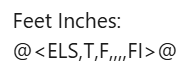
(For some reason, RPS wont allow me to type multiple commas so here is a screenshot of the smart text code)
Equation with formula:
@<ELS,T,F|-35.05>@
I’d love to hear of any tips you use for model QC. Feel free to DM me if anyone wants to talk TBC, Takeoffs, or Machine Control Models.
PS. Sorry about the low quality video, I’m still figuring out OBS Studio for screen recording.