For instance: You have a building pad that requires all fill material be Select fill with a minimum 18". So the areas with a fill greater than 18" the Select fill depth needs to extend to the original stripped and demoed surface. What is the best method for calculating and reporting the volume of select fill in the pad?
I would use the Overexcavation command to do this - You would enter the settings as below
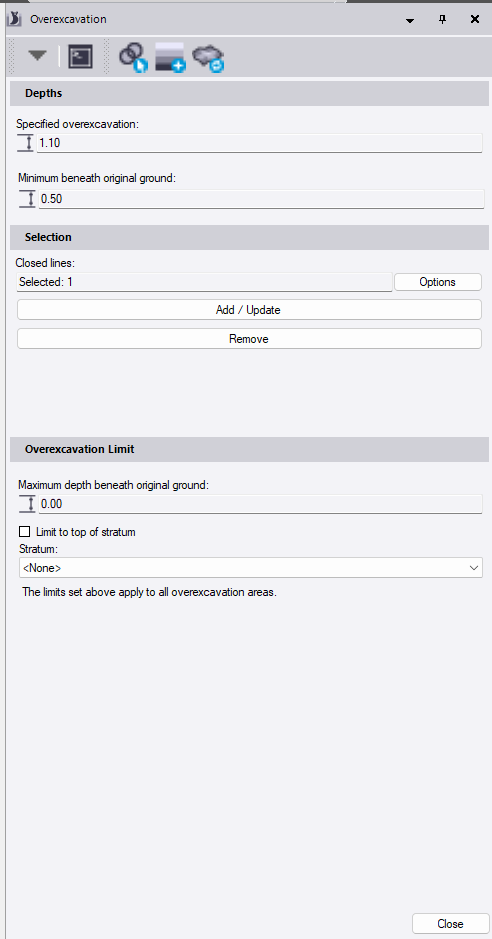
Note that Overex in TBC is computed below Subgrade Adjusted Finished Grade and can work with existing with a constant offset e.g for Topsoil Consideration
The Overex settings above will create an overex below Finished Grade with Subgrades Removed of 1.1’ and will also dig out at least 0.5’ of existing.
The Overex Calculations in TBC eliminate Topsoil Strip and Demolition from the quantities automatically,
The Overex computation is both the removal and the same number is the backfill of granular fill required. The overex is not incorporated into the Earthworks Cut / Fill quantities - it is treated as a separate line item in the Takeoff.
Hope that this helps
Alan
1 Like
Alan, thank you for answering my question so timely. That does give me close to the correct calculation, but doesn’t seem to be quite correct. It’s only calculating 1.1’ below the lowest subgrade material in the cut area. It’s also incorrect because it’s disregarding the stripping and existing SI as you mentioned. Was that your methodology behind the value of .5’ minimum below surface, to account for stripping depth? I have multiple depths of existing SI in the pad area. Why does Overex eliminate those factors?
Also, because both the select fill and the mass earthwork isn’t reported correctly it needs to manually edited. The only way I managed to get the perceived correct values (which still required manual editing of the report) was to calc the subgrade adjusted surface to the stripped demoed OG in the pad bounded area. Am I misunderstanding? Would be great to have an option to define SI the way overex can be defined.
Thanks for all your great help Alan.
It’s been a little while since I’ve used takeoff features but this came to mind.
instead of trying to apply the select material as an SI only add in the concrete or finish material. then define the pad as an area of interest. when it calculates to your stripped ground the remaining volume in the area of interest would reflect the select material and be a separate line item in the report.
Not sure if it would work or not but worth a shot, hope it helps.
-Joe
1 Like
Yes, that was my method I described in my last post and the only way I could get an accurate calculation. It’s just kinda a bummer that a common subgrade treatment like this needs a work around and needs all the report values manually edited. But maybe I’m not understanding @alan.sharp correctly, hopefully he will chime back in when he has time. Thx
I looked in detail at the overex quantity and it is excluding the volumes of stripping and demolition so that they are not double counted
I created an OG
I added a topsoil strip
I added a demolition area and excluded it from topsoil strip
I added a design and subgrade adjusted the design then added overex to the design boundary to compute the overex quantity.
In a fill area where you have overex of existing, the overex is just the amount of existing that has to be removed and backfilled and then it is topped off with fill - if that is all the same material then as Joe suggests you can add an AOI around the area so that the fill is quantified by that area - you would still have to.add the overex to the fill to get the total qty of granular fill bit it is excluding the demo and topsoil strip based on my tests.
I was evaluating our Volumes Manager command to see how it did in computing and managing these qtys - once the surfaces are created you can create volume calcs to derive what you need - it did pretty well
2 Likes