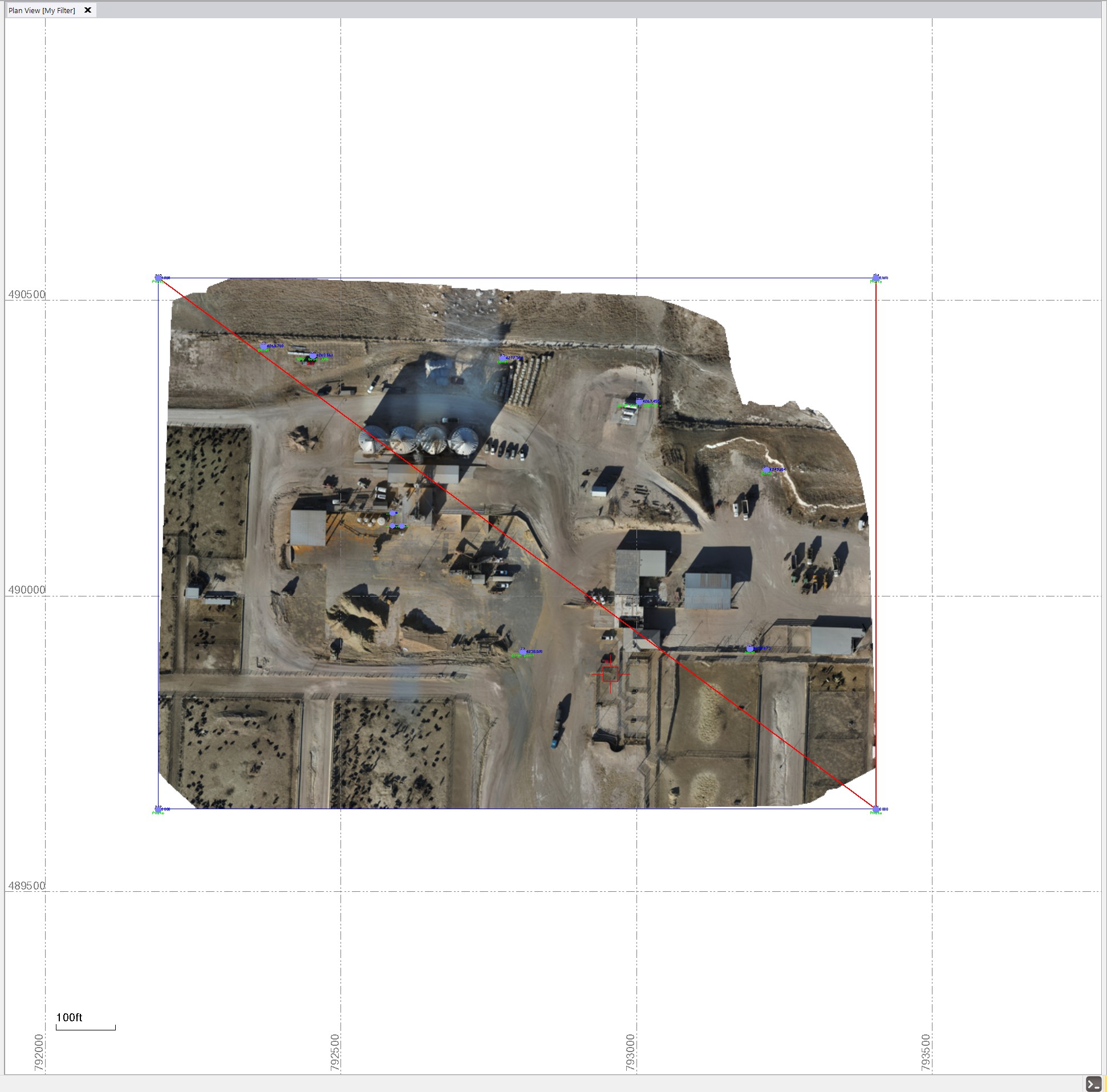
I have a LS that does some lidar flights for me when I can’t get to them myself. He uses PIX4D to do his processing in. He also uses a traditional camera so that we good hi res images. PIX4D exports out a ortho photo and when it is imported in to AutoCad in comes right in with no problems. When I try to bring it in to TBC it will only bring it in using meters even though there is a TWF file. I even opened the TFW in notebook and the coordinates are in feet and match the project. When importing the file in TBC I select Grid feet and the import coordinates settings. But it scales the photo up to meters! I don’t know if is a bug or what in TBC. I opened a new default project and it did the same thing. I placed the image using the geo-reference command and got into the right location. I thought i would export the file out of TBC and bring it back in but it scaled it all up again and put it right where it came n the first time. Anybody got any suggestions? Also, why hasn’t Trimble developed a better image command? It would be nice if you could edit the coordinates in the properties dialog box to what they need to be. But you can’t even do that.
Thanks for any help in advance.
@Ben_Ryschon have you had any success with this? Do you have a way to share the image? I’m sure it’s enormous. I had the reverse problem going from TBC to C3D a couple years ago. Find a way to share the image and I’ll go dig up my notes!
The files size is 4.73 GB. I will provide a link and the .tfw
Dropbox.
Dinklage Sidney P1 1-9-26_transparent_mosaic_group1.tfw (75 Bytes)
tif?rlkey=y7jxvy90zwq2obve4qkphnfv8&st=nm3hfr8u&dl=0

This appears to be a Geotiff, which doesn’t require the tfw in TBC because it already contains the coordinate and unit metadata. In the latest version of TBC, the image imports at coordinates that seem to match the coordinates in the tfw, and it scales to US Survey Feet, not meters. What is the target coordinate system? What is the coordinate system supposed to be coming out of PIX4D? What version of TBC are you running? Can you share your Civil 3D drawing, or at least a screen shot of your coordinate system and zone in Civil 3D in the Edit Drawing Settings dialog box?
no experience with this. If you did a drag and drop that could be the problem. Use the long method and us the import command. that should give you options for units.
Even if you use the import command and select a different unit, it will still import in whatever units are buried in the image metadata and pop up a warning message saying the units you selected could not be used, so the units in the image metadata were used instead.
That is what I was getting also. My guy claims that pix4D is set to us survey feet but I was wondering it is doing all of its processing in meters and then trying to kick it back out in survey feet. I believe that is what TBS does in the background. I am running 2025.10 which I have been meaning to upgrade to the latest. I just wanted to make sure my Rockpile commands were able to work in the new version since I am in the middle of a job that I am using them on.
It should be coming out in a ground scaled NE state plane coordinate system. To get it to do what I needed for now I had to georeference the file into location. I attached the cad file with the photo border I used. Sure wish there was a better way in TBC to work with photos…
Dinklage Sidney 1-9-26.dwg (25.5 KB)
I don’t think I’m seeing the same trouble that you are having. I started a new TBC project with the default WGS84 coordinate system, imported the dwg, then imported the image, and the image lines up perfectly with your image frame. Assuming it’s not a TBC version issue, I suspect that something is different about the coordinate system in your TBC project, or else Dropbox stripped some metadata so TBC is not automatically adjusting the image. If I was in your shoes, I would download the Dropbox image from the cloud and see if that makes a difference on import behavior.
I just tried doing what you did. I was pretty sure i had already tried it but what to be sure before I said anything. I still get the warring that meters instead of feet were used and it still puts it clear up to the NE. Maybe it is a TBC issue!?
I think you are correct about it being a TBC issue, Ben. I forgot I had access to a laptop with TBC 2025.10, and I’m seeing the same behavior as you on that version. I double checked EXIF data using QGIS, and at a glance EXIF data appears to be intact.
@alan.sharp or @Chris_Bayliff , can you confirm that RPS commands are working bug-free with TBC 2025.20?
Hi - I’m using RPS with 2025.20.1 and have NOT found any issues (admittedly I don’t use all the commands)
We are not involved in this process so I am not sure what you mean to confirm we are working bug free in 2025.20 - our software is solid but I am sure not 100% bug free, we fix bugs when they appear and updatequickly, but this is not a question that relates to this issue because the functions in use are 100% TBC functions.
Alan
@alan.sharp, Ben was hesitating to update TBC (which would probably fix his problem) because of uncertainty that Rockpile commands would work correctly with the latest version of TBC (Trimble updates have temporarily broken Rockpile commands consistently for the last several versions). Bug-free was probably a poor choice of words 
Are Rockpile commands functioning normally in TBC 2025.20?
Yes they are fully tested against TBC 2025.20 and are fully compatible
The reason that you get incompatibilities at version changes is because Trimble changes APIs or SDK cals that we are using / have been using, or because they switch out eg the PDF Tools for a new set of tools without telling us it is happening. The issues they create are effectively “Bugs” on our side but not created by anything we are doing on our side. It dors take time to address these, and even if we have access to Beta Versions ahead of release, they are still making changes all the way up to their release so it takes time to work through the final release when it hapens.
Unfortunately this is the nature of the beast when you run as a “Plug In’ to a third party platform, we try to be ready for their release. but most of these types of changes are undocumented and we are not informed so we have to fnd them out for ourselves. We also are not allpowed to demonstrate our products on an unreleased version of TBC so that also makes it a little prohibitive in terms of time and convenience on our side als.
Alan
1 Like
Thank you Alan, I will be updating this weekend to the newest version.
I am using 2025.20 of TBC
I started a new US Ft project - no coord system set
I dragged and dropped te DWG file - it has the drawing frame shown, and a Block Reference Miles away that has a small piece of text in it. I exploded and deleted the data miles away. I ten imported the TIFF file and I get this
Cordinates shown are 792000 E and 489500 N in the Lower left Corner and 793500 E and 490500N in the Upper right Corner.
The image sits on top of the frame from the DWG file OK
Are the coords what you are expecting?
They seem to match what I am seeing in Civil 3D?
Alan
Yes, those coordinates look right. I am wondering if it was just in the 2025.1 version of TBC that was the issue. I will try and import it into this newer version once I get a little more time.
Thanks