This morning I had a call with a client that had an issue where they Migrated servers and after that migration, their RPS Settings would come up blank. We tried fresh install of RPS with no luck. We were able to luckily give access to the old server and restart TBC, at that point RPS Settings populated, and we were able to change the file path to the new location.
We were able to find a back door option to resolve this issue in the registry.
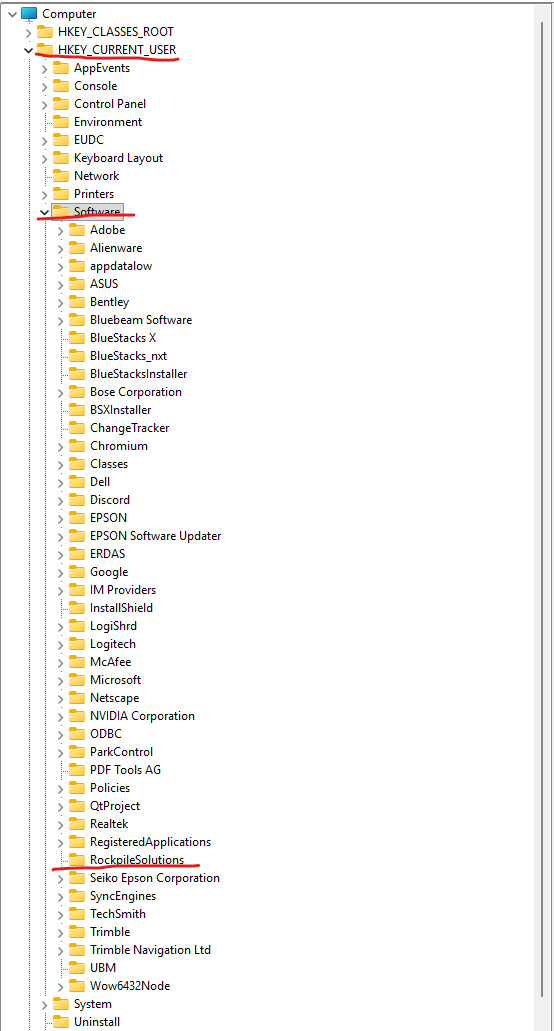
If you go to your Search in the task bar, type in CMD, this will bring up the command prompt. Type in RegEdit. This will bring up the Registry.
Go to:
HKEY_CURRENT_USER
Software
Rockpile Solutions
You will see 2 file in this location. If you delete the SettingsFolder registration, do a fresh install of RPS Tools, it should populate the default file path for RPS Settings and resolve this issue.
You can also double click the setting that shows the RPS Settings file path and simply change the path tio what you want it to be, then place a copy of your RPS Settings files at that location and you should be ready to Rockpile again!
I am the person who had the issue with one of my users. If Rockpile can’t see the path, it just errors. You cannot go into RPS Settings and change it. It comes up with an error then the pop up screen is blank. Trust me, that’s the first thing I did before even reaching out to Chris haha. Our workaround was having my boss give them access back to their old User Network drive, copying the Rockpile folder over to it, then it could change because it could see the path again.
Chris reached back out later that day talking about what he’s saying up above. I am currently testing it.