Dec 24 2025
RPS Command Library v2026.10 Released Today
We are excited to announce the much-awaited release of the RPS Command Library v2026.1 today - Happy Christmas - Santa came a day early in the Northern Hemisphere!
Download - Click Here
This release is the biggest and best ever in my opinion, it is packed with new commands, major command enhancements, new cleaner user interface for many commands, and new capabilities like our new dynamic spreadsheet reporting system, customizable color picker and so much more.
This release includes our first complete solutions for Site, Highways and Utility contractors that provide both 2D and 3D Earthworks Takeoff capabilities, as well as extended Takeoff elements to calculate e.g. Concrete Reinforcement Quantities like Rebar, Tiebars, and Dowel Baskets / Dowel Rods or road pavement / highways operations.
The release continues to evolve our processes for Faster, Easier, Smarter, More Comprehensive and More Integrated Workflows.
The release also incorporates improvements to our License validation system, making commands faster to start up and use (after the first command which needs to load our new User Interface Libraries which takes a couple of seconds)
We think you are going to love it!
Key New Commands
Key new commands include the following
Smart Feature Command
Ideal for Surveyors, Construction Inspectors, Modelers and Takeoff professionals.
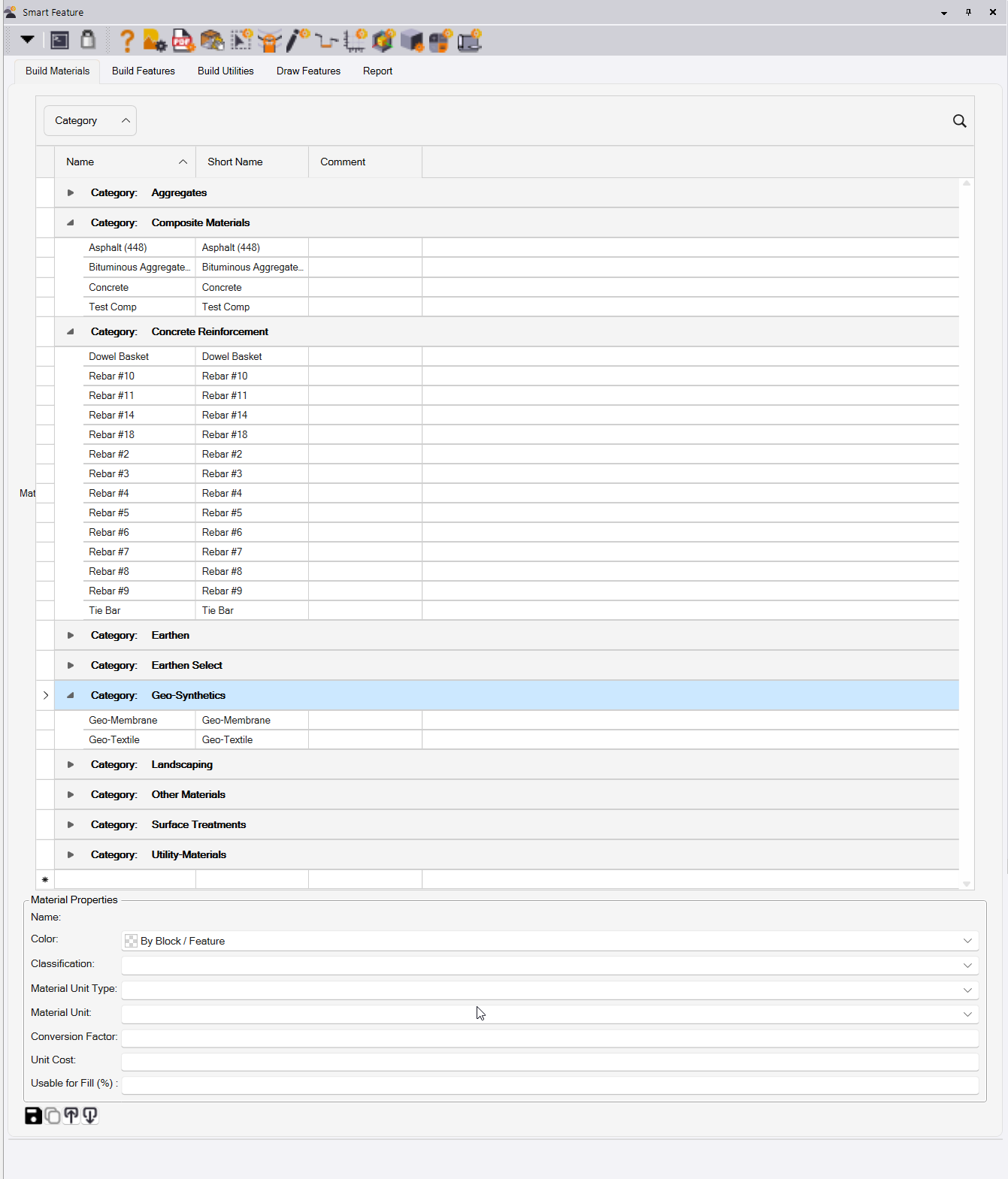
Approach your work in an entirely new way using Smart Features. Historically we have drawn lines, on a layer, with a color and a name, and then categorize them as Design or Existing and then assign site improvements e.g. to areas to create a feature. Then we edit the properties to set a fill color to shade the drawing.
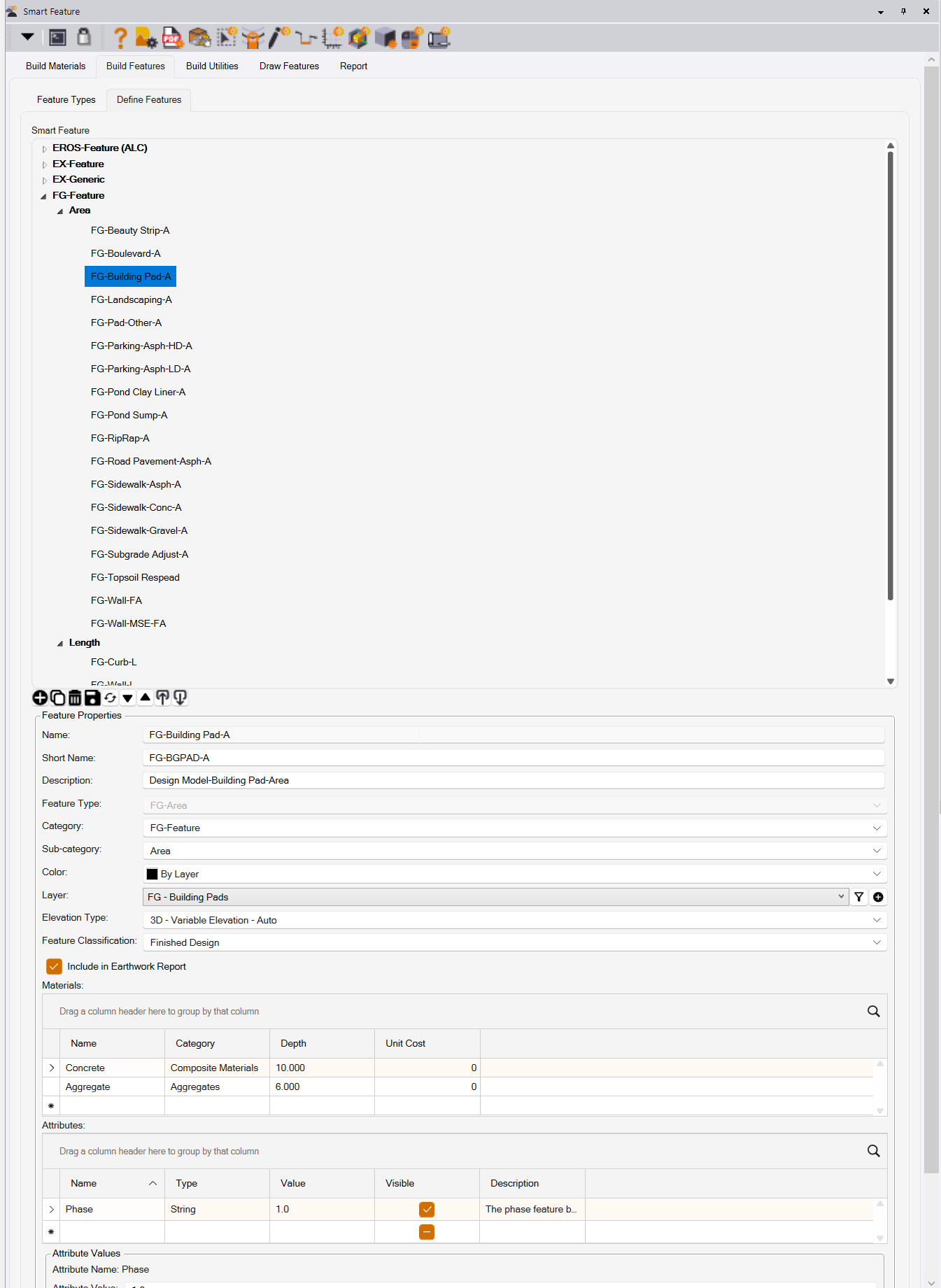
With Smart Feature, we now define a centrally managed Materials and Feature Library that defines your Materials and your Features including all of these parameters, and additionally you can define how the feature is elevated (2D, Single Z or Variable Z), and whether it is a point / count, a line / length, polygon / area, a length width (road pavement) or length area (curb and subgrade or edge detail). The layer, color, fill color, name, incorporated materials and reporting is now fully automated
Materals Manager
Feature Manager
Utility Feature Manager
- Click on the feature and it’s quantities are listed right there in the properties pane
- Open the report and all your features are reported automatically in the new spreadsheet report
- Features are color coded based on the Feature definition making them easy to correlate
- Change the length of a feature, the area of a feature, the thickness of a material in a feature and the feature attribute properties and Takeoff Reports update directly, ensuring that you are always looking at the current results.
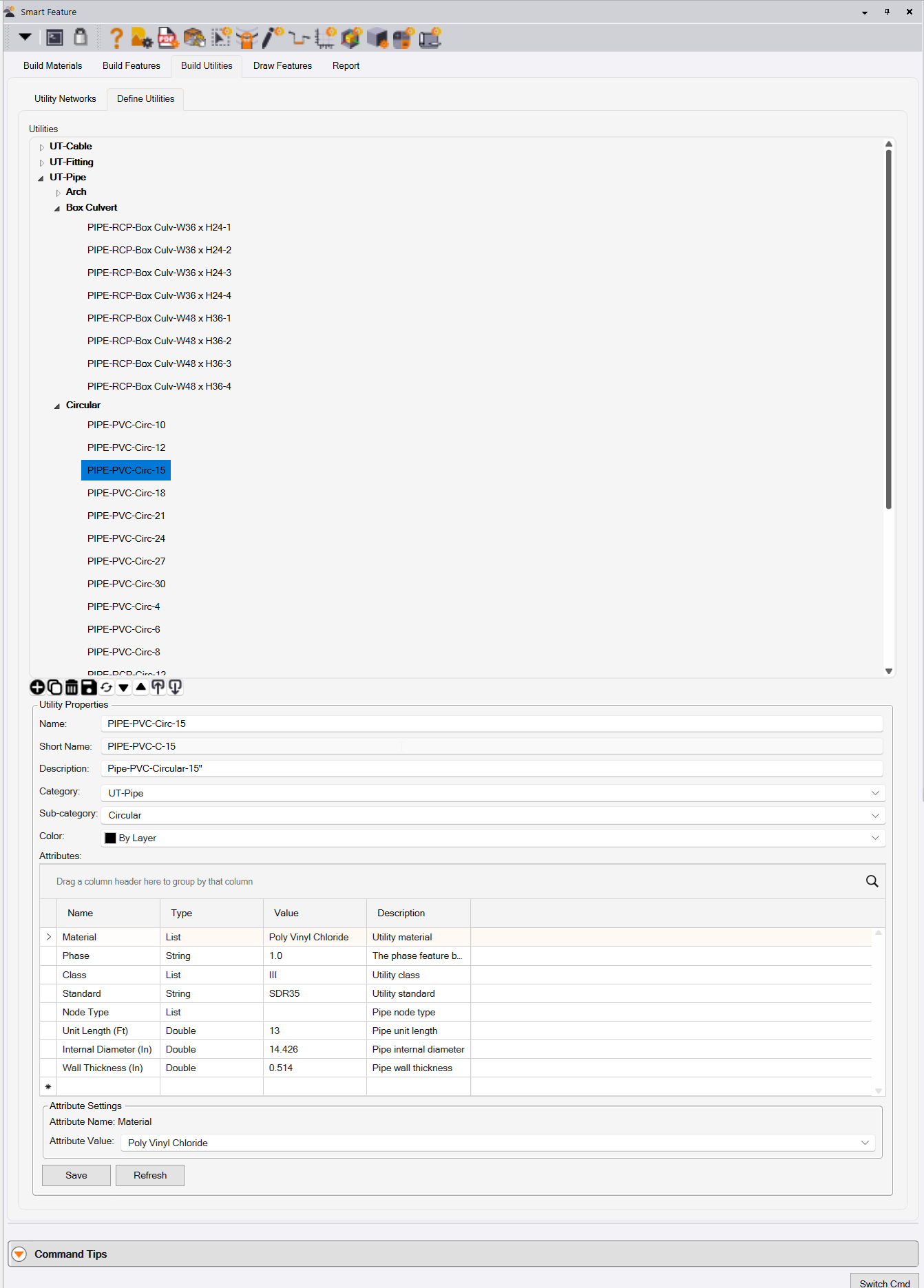
Smart Feature also supports Utility Pipes, Cables, Structures and Fittings for automated Utility Takeoff. Combine Smart Feature with the new Smart Profile command and create your utility models using 2D plan linework and featurized profile drawings for a faster more seamless solution.
Smart Feature can create features from Imported CAD data or Extracted PDF data using the Assign Feature mode. This is a quicker, smarter way to convert imported information into objects on the right layer, color, linestyle, category and material assignents and eliminates a large number of process steps.
Assigning Features
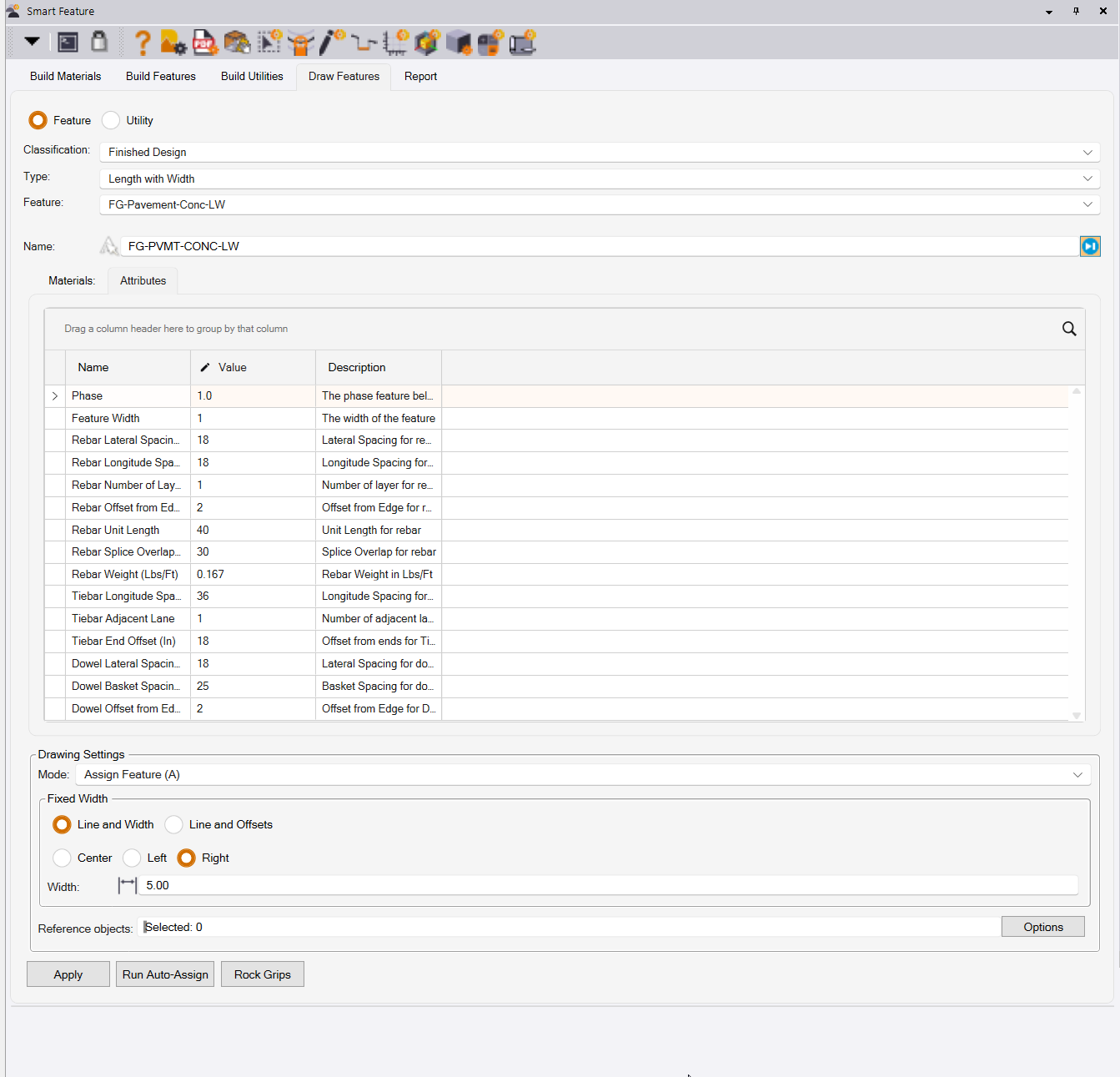
Smart Feature can draw / trace features and now includes a better arc fit and smooth curve fit into created linework making it faster and easier to draw complex curvilinear features.
Drawing features
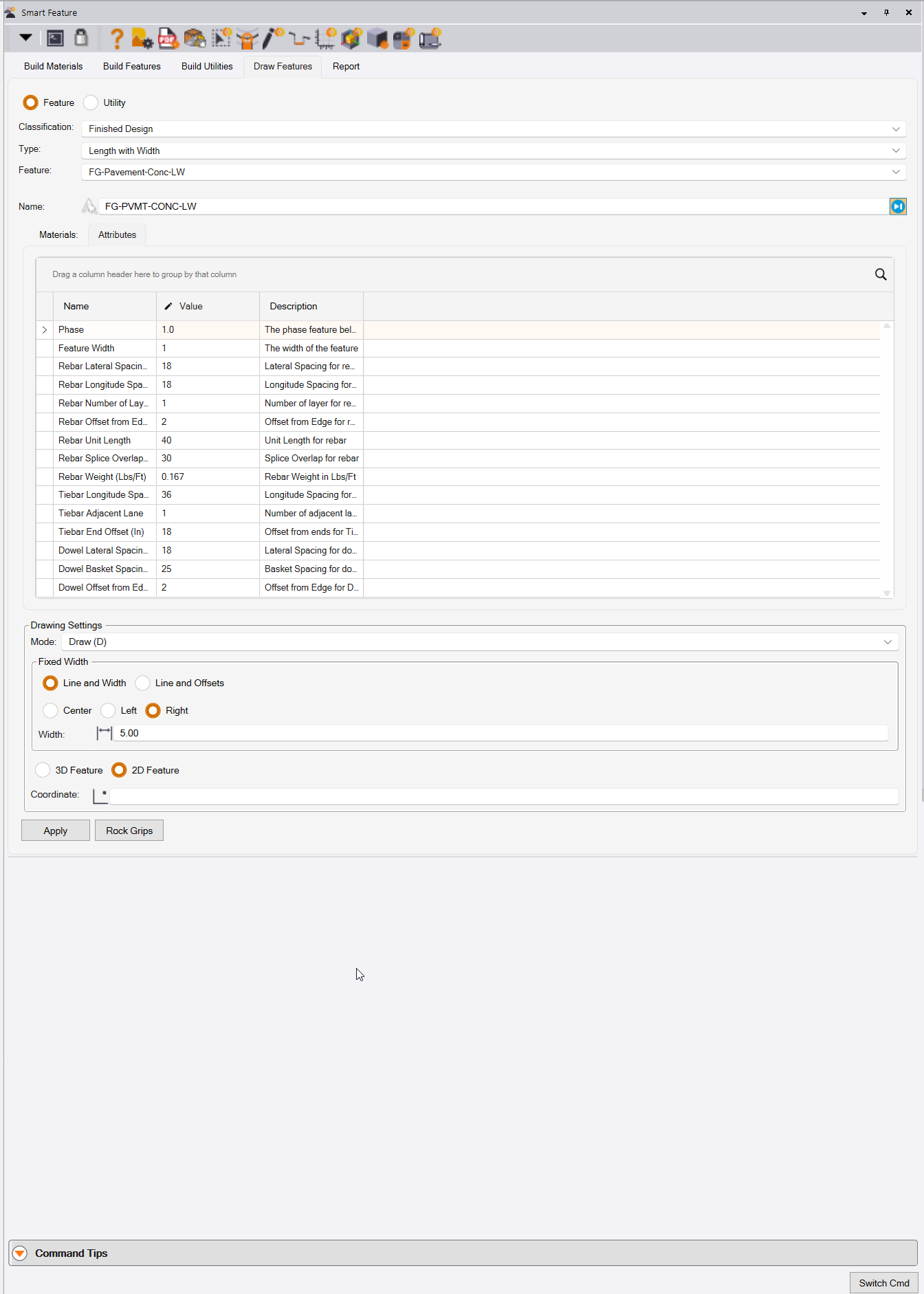
Smart Feature provides 2D or 3D modes for doing 2D or 3D Takeoffs. For 3D the feature dictates how elevations will be applied (no elevation, single elevation, variable elevation along the lines), and whether or not the feature is a point, line or closed area feature. The feature also defines whether it is Topsoil Strip, Demolition, Existing, Finished Grade, Subgrade, Landscape / Respread in nature, and that sets you up for Takeoff using the new Smart Takeoff command.
Smart Feature let’s you draw and track existing linework interactively, select J key on keyboard and hover over a line to select it and then define from and to location along the line to use all or part of the selected line in your feature. Click additional points in between to get the geometry exactly as you need it.
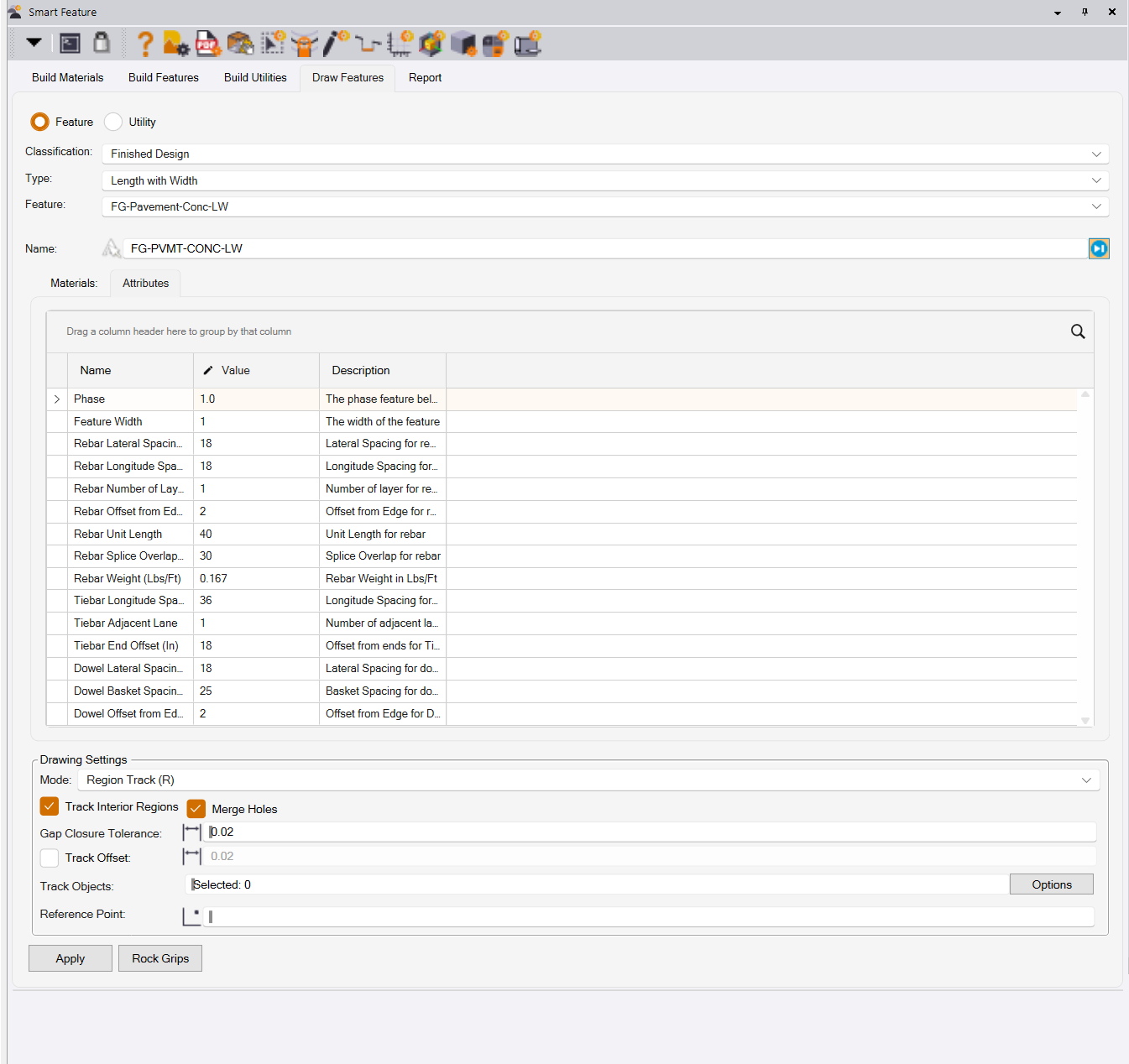
Smart Feature also allows you to create area features by tracking linework that encloses an area, it includes hole and island support, and offsets the line a touch to stop your features from overlapping.
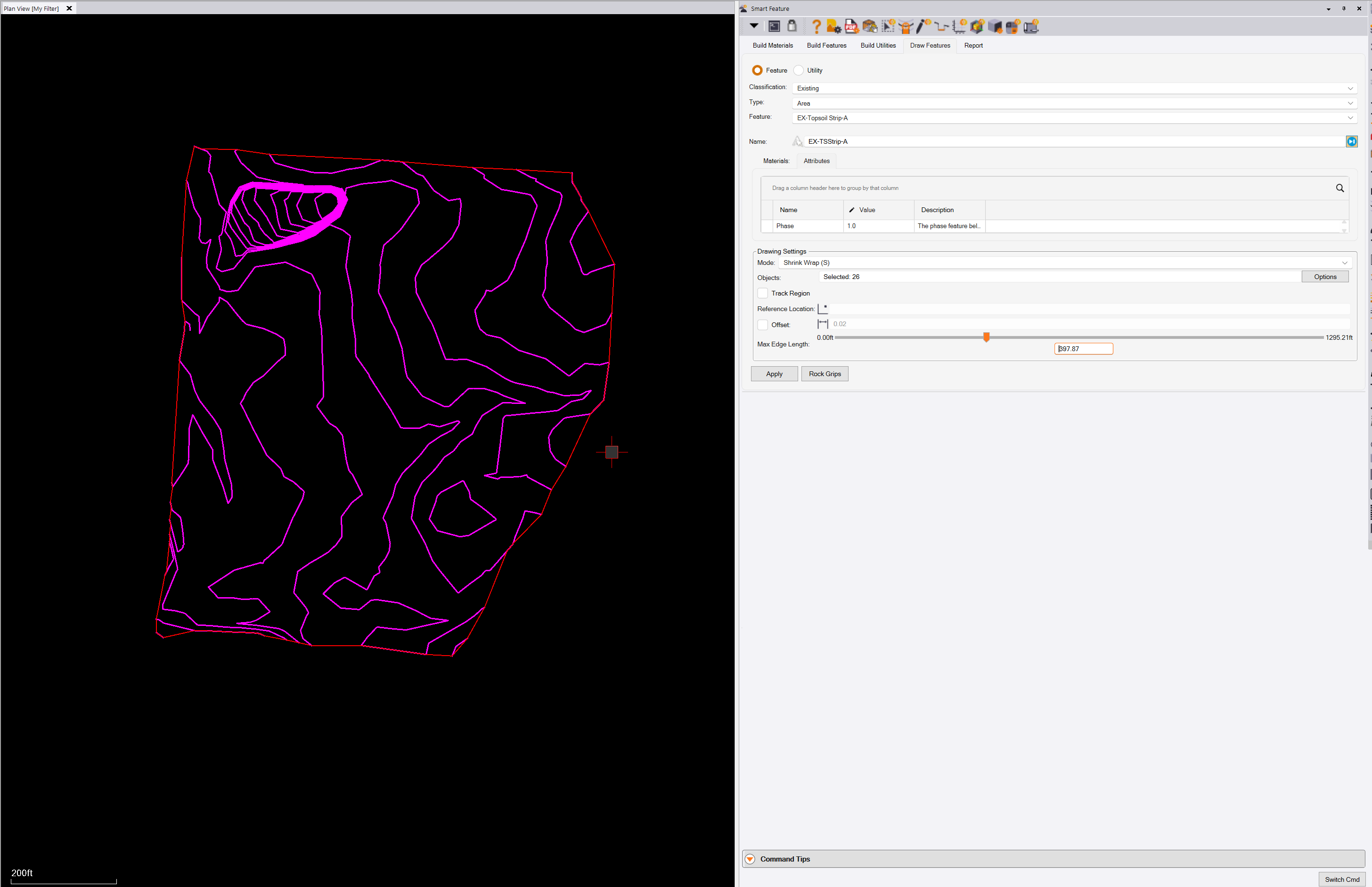
Smart Feature also allows to to shrink wrap around a set of data, and has a dynamic edge length slider that allows you to preview the result and offset it prior to execution.
Smart Feature will revolutionize your work process, it is more dynamic, more flexible, provides an integrated workflow, fewer steps, and generates 100% consistent results, project after project. It provides smarter objects, far richer data, and full materials reporting in a fully automated and dynamically linked manner.
What’s more, for Highways Estimators, it. Computes your pavement materials (aggregates and concrete or asphalt), but also your concrete reinforcement materials like Rebar, Tiebars, Dowel Baskets and more all in the same single feature creation step.
Smart Takeoff Command
Follow on Smart Feature with Smart Takeoff for all your 3D earthworks needs. Calculate Topsoil Strip and Topsoil Respread, Demolition Adjustments, Subgrade / Sectional Quantities, Earthworks quantities overall and underneath selected features.
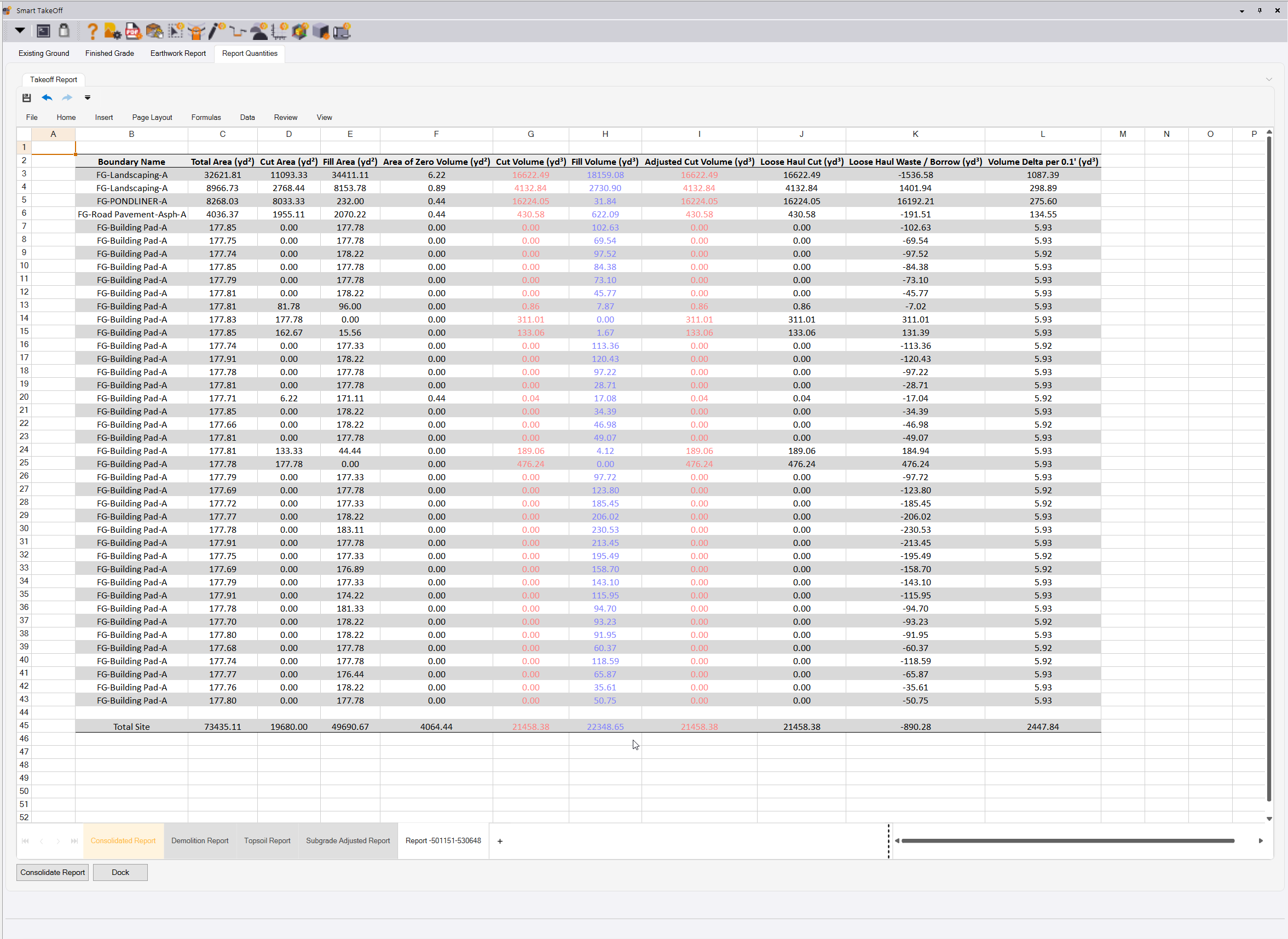
Subgrade adjusted surfaces are made up from linework just like any other surface, so you can further adjust them to meet your quantity needs, prior to reviewing your final earthworks reports.
Reports can be executed using Grid volumes for speed, or Triangle based volumes for increased accuracy for your final numbers.
Again fully automated reporting in the new spreadsheet reporting tool. Overex, Overbuild and Strata coming soon.
Smart Profile Command

Calibrate profile drawings for Roads, Utilities, MSE Walls, carry out measurements and report them directly into our new spreadsheet reports, distances, depth of cover, depth bracket analysis, Station and elevation checks, running distances, areas and more.
Convert profiles and elevation drawings into 3D Linework or featurize the utility profile and create utility runs automatically.
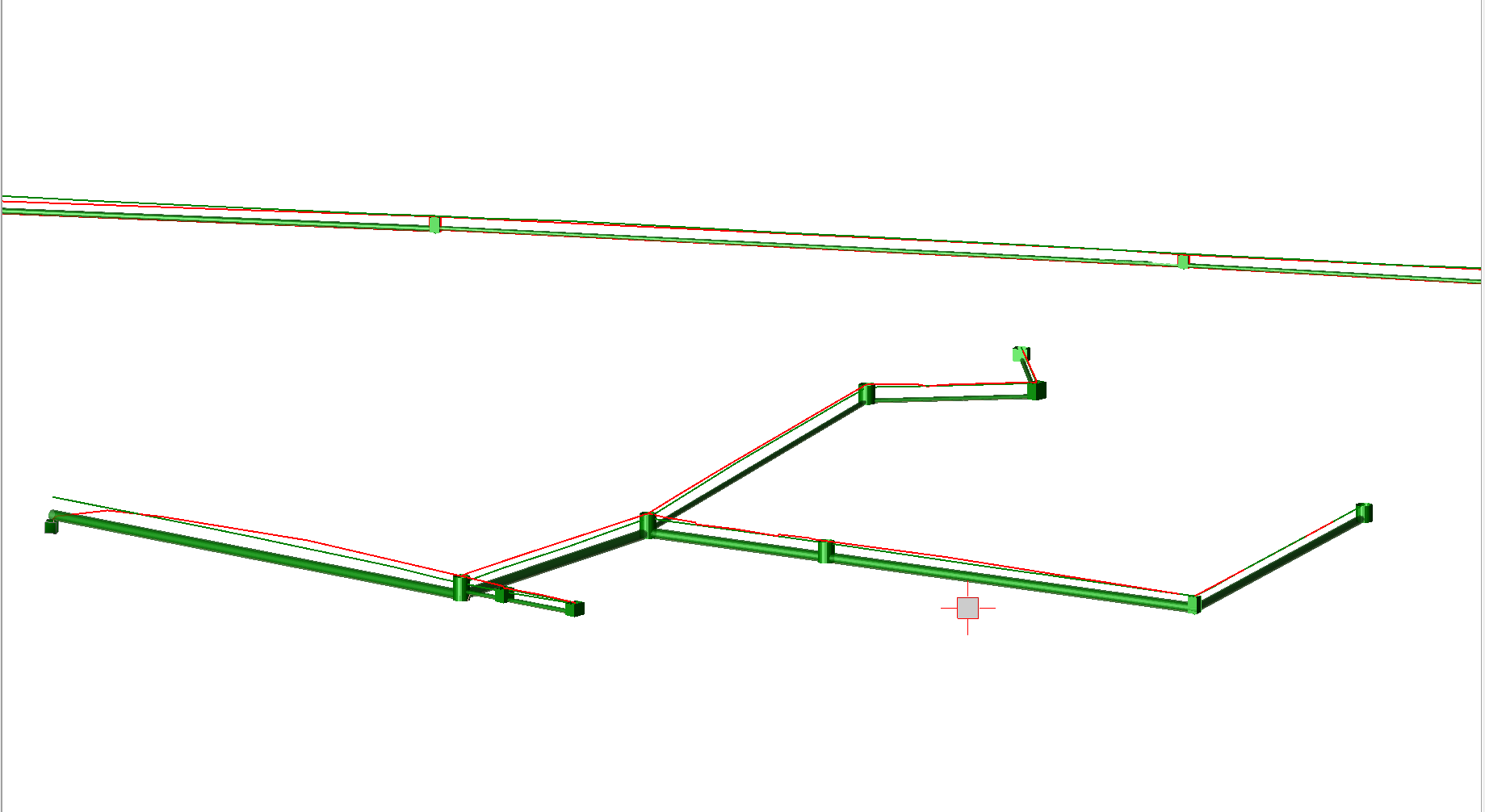
MSE / Abutment Wall Elevations

Smart Plot Command
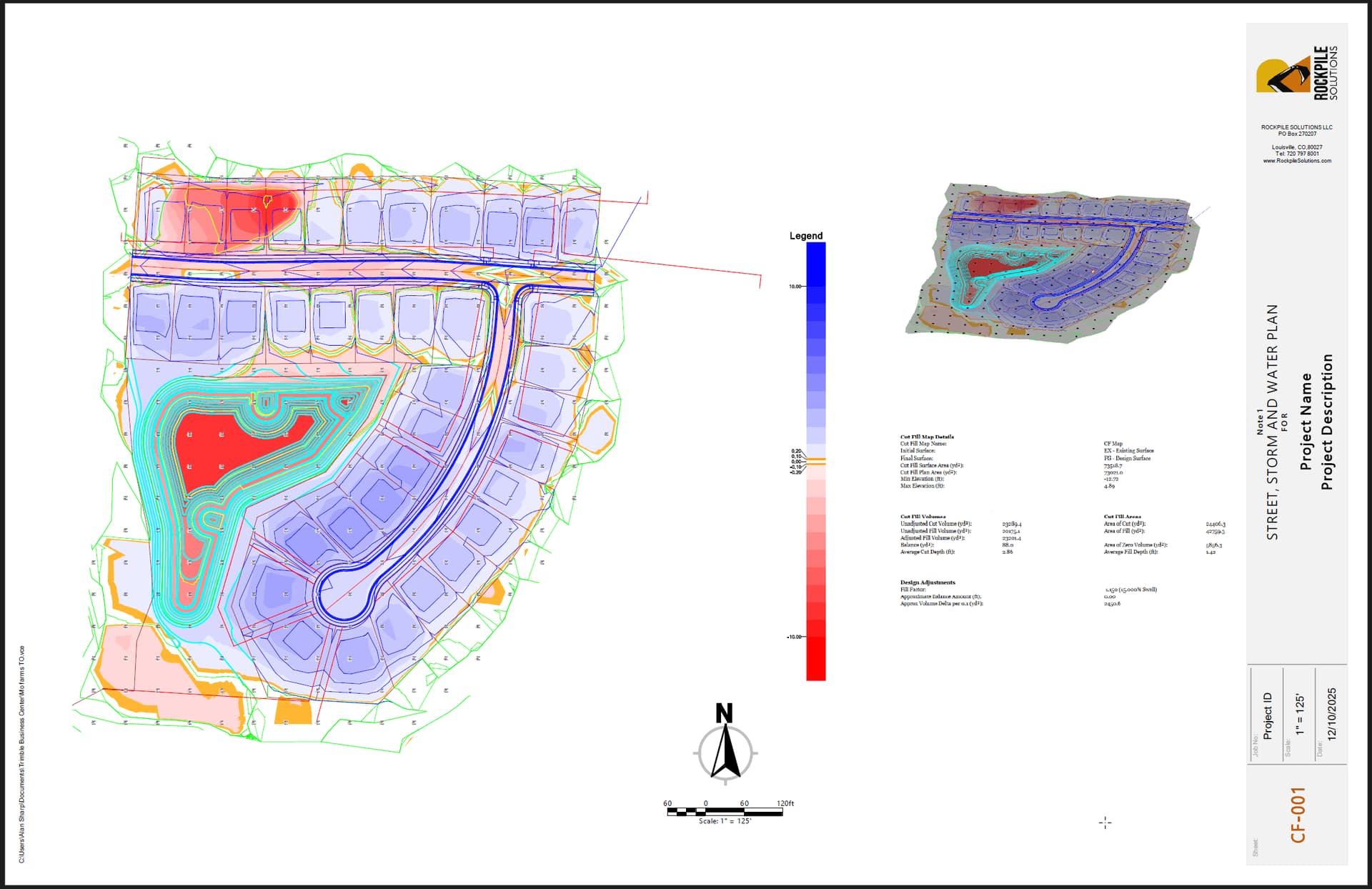
An exciting, new, fast, easy and powerful way to create your drawing output - add your logo, pick your template styles, pick your sheet size and orientation, pick the area of the project you want to plot, dynamically adjust scale and orientation, or align sheet to a selected feature and accept to produce your drawing complete with titles and borders, North Arrow, Scalebar, Grid and automated sheet numbering.
Split your sheets to reserve space for other information like 3D views or volume and Takeoff Reports. Use in combination with RPS Paste to create compelling plan or profile drawing deliverables for Cut Fill maps, As Built maps, Site Improvement maps, Work in Progress maps and more.
Quick Alignment Command
Convert multiple selected lines into horizontal and or vertical alignments with automated alignment labels in a single step.
Smart Pane Command
Smart Pane is our first Pane based command. It brings a whole new dynamic to TBC. The Pane can be floated on a second screen, can be left open all the time, and has multiple pane capability.
Each Pane can show one of a number of tools and multiple instance of each tool.
The Spreadsheet tool has full formula and pivot table capability, as well as multi tab capability and integrated charting options etc.
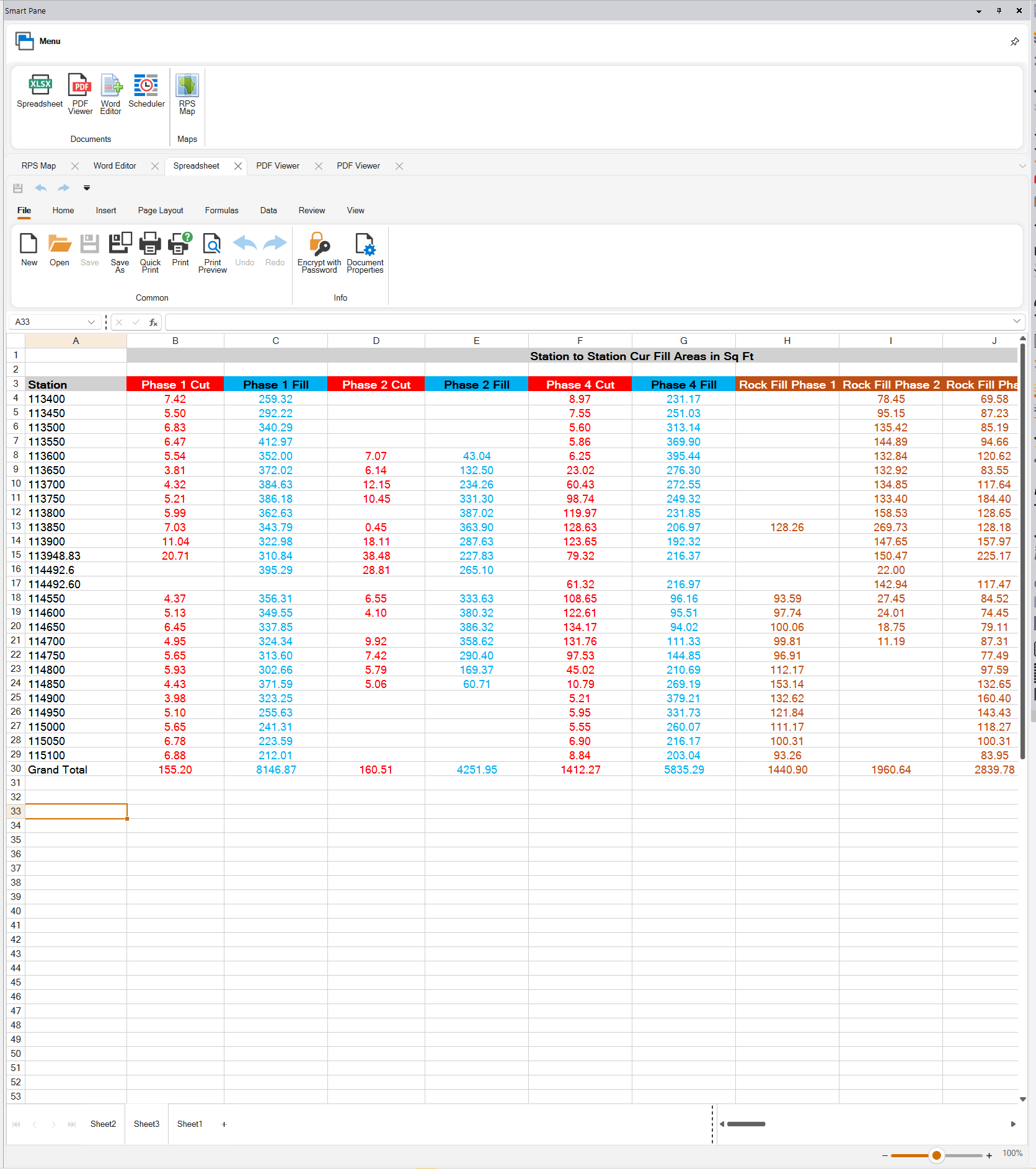
The panes can show full PDF files with fast viewing of hundreds of pages, bookmarks and full comment and markup capabilities.

The panes can show one or more document files with rich text capabilities as well as interactive Copy / Paste options allowing you to add screen grabs of plans, 3D Views, Reports, Sections, Profiles, Slicer views and more to supplement your reports.
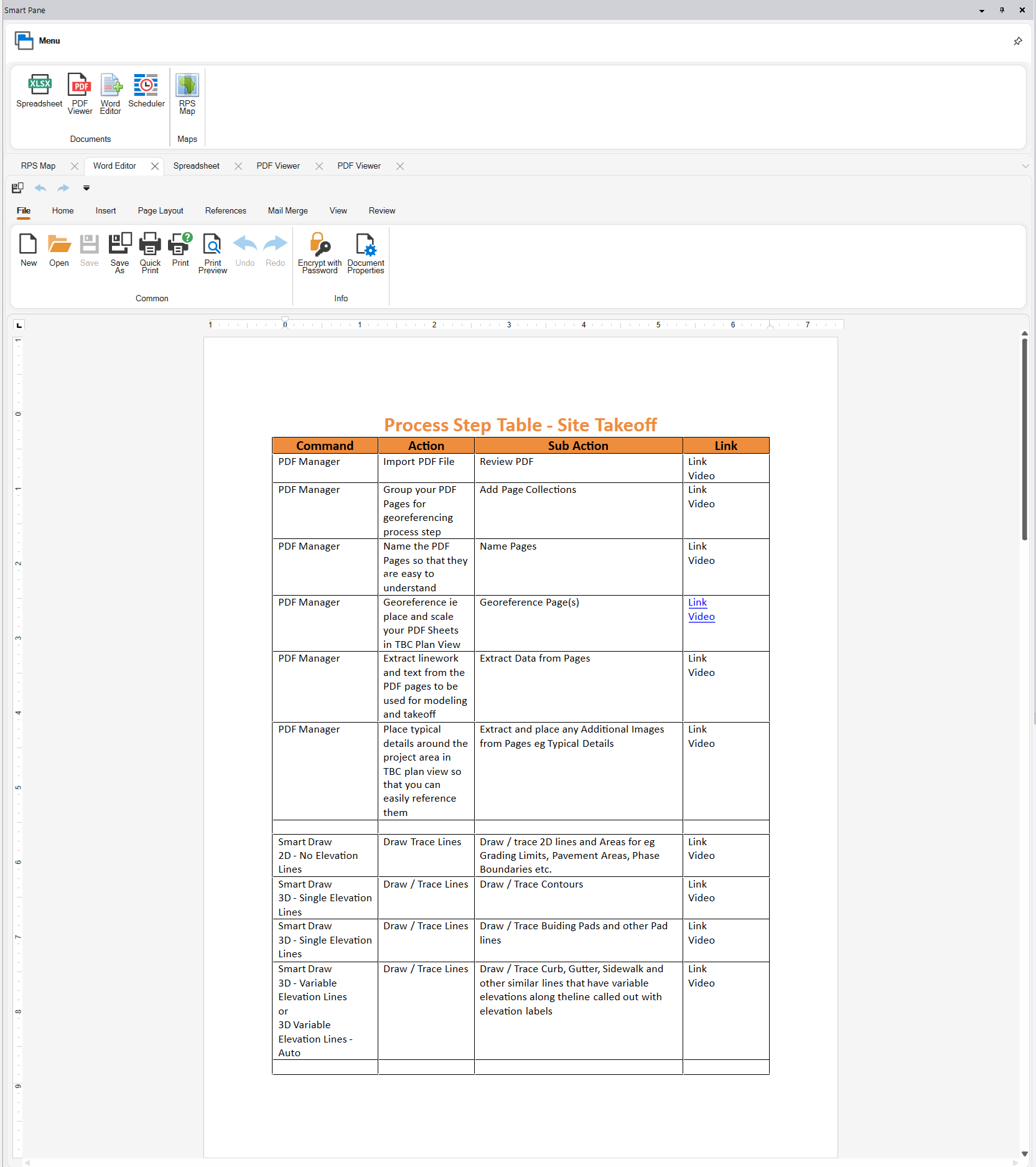
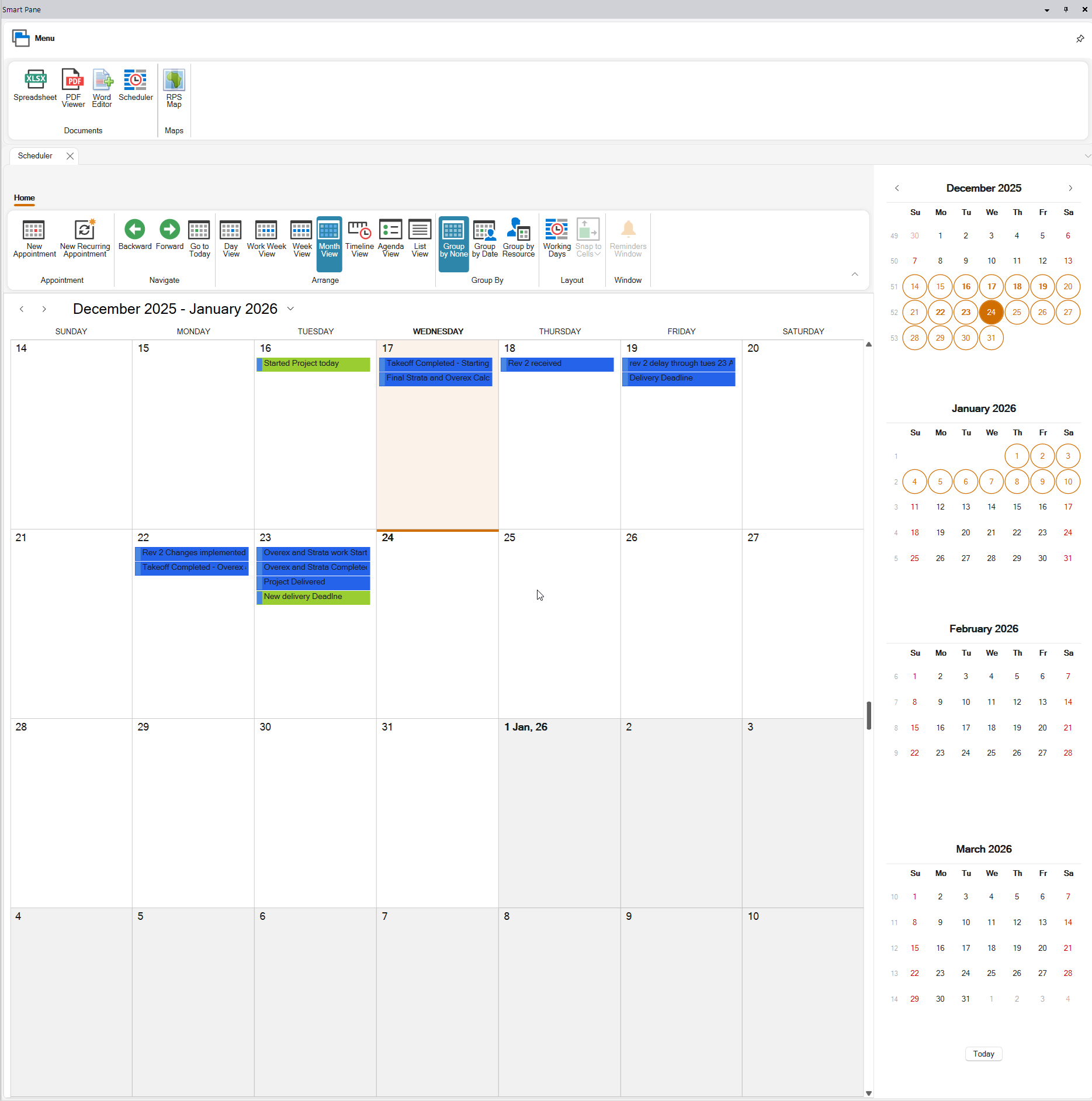
The panes can also display a scheduler, this can be used to record project development activities and schedule milestones and deliverable dates etc.
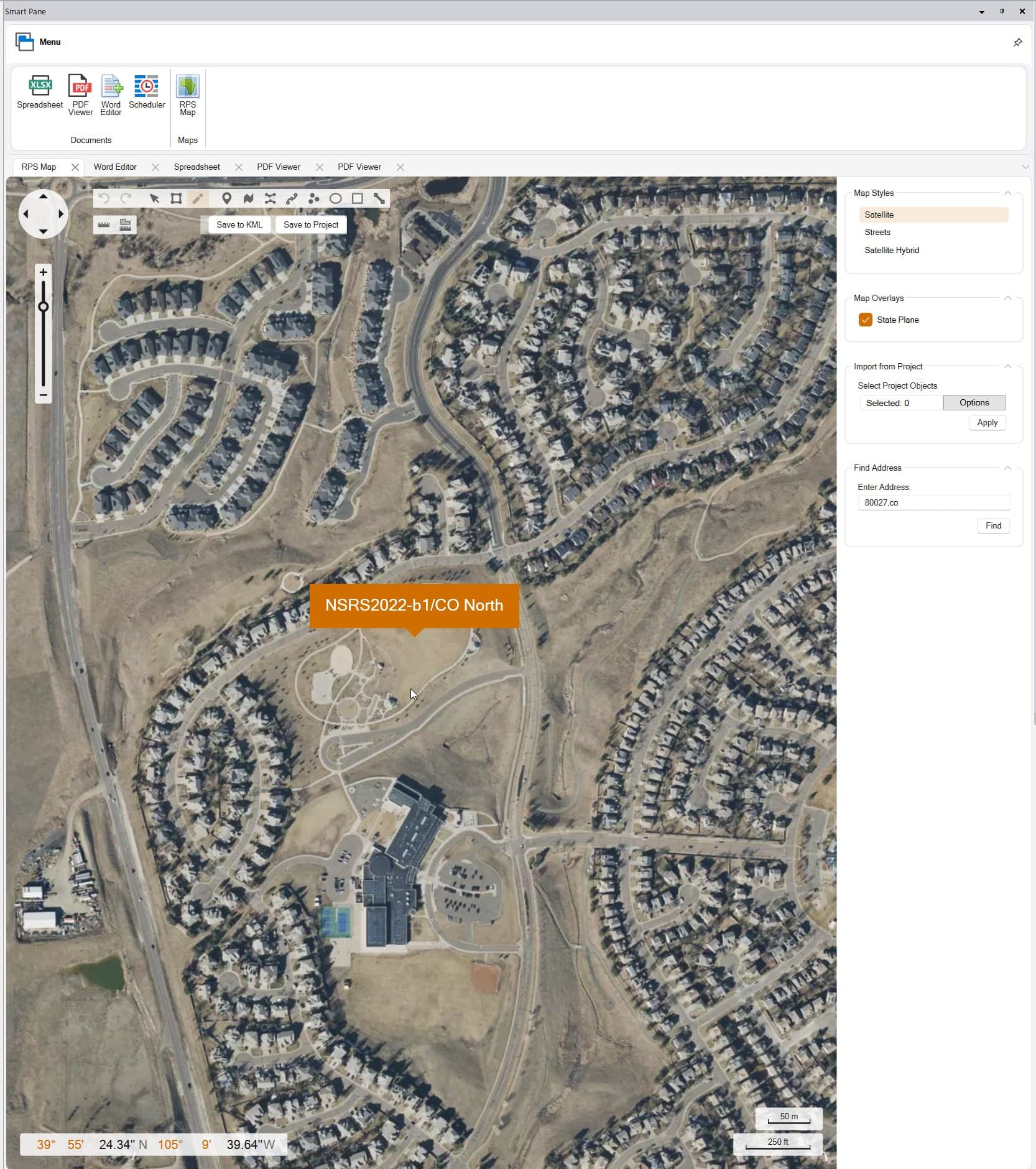
The panes can also display Satellite and Street Maps, we have added an overlay for State Plane Zone query, address and zip code search, draw over tools for creating site boundaries or marking key project locations that with a single click can be transferred to or from your TBC project database. There is lot to come from Smart Pane, this is a massive improvement to TBC overall capability and opens a whole new world for Takeoff and Project Bid creation.
Major Command Enhancements
PDF Manager Command
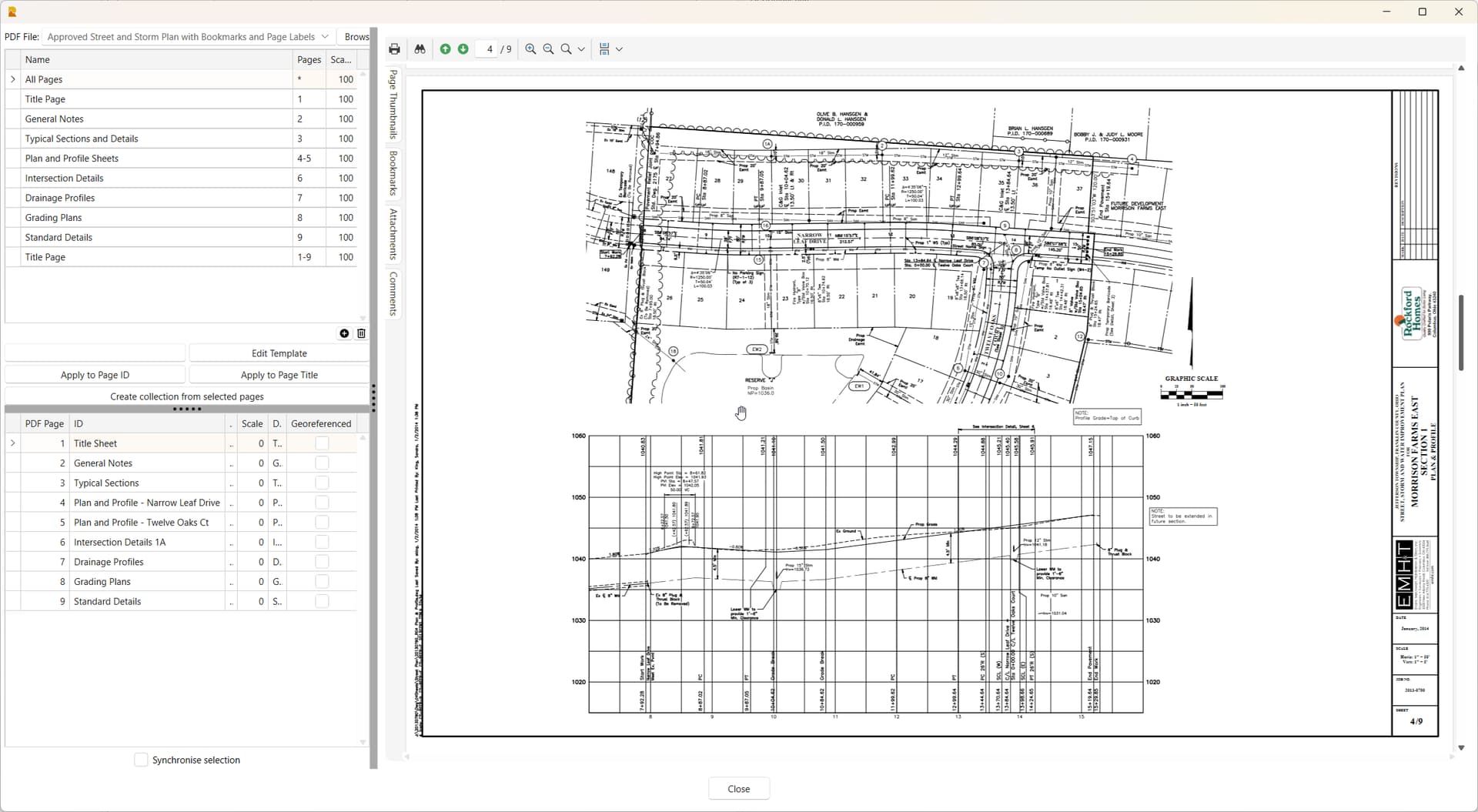
The PDF Manager now has a faster, smarter review pane and a cleaner faster interface for organizing your pages into page collections. The reviewer has more dynamic and faster drawing regeneration, thumbnail navigation that allows you to review hundreds of pages quickly and efficiently.
The PDF Data Extraction process is now 100% RPS technology, we have invested in improving the data output, sorting of the data, the handling of dashed lines, solid lines, text and fills so that you get ahigher quality data extraction, layered, organized and cleaner than ever before. Spending a few minutes more on data extraction across single or multiple sheets in a single step, can save huge amounts of Data prep time downstream, and faster computatiions because the data is cleaner and easer to work with.
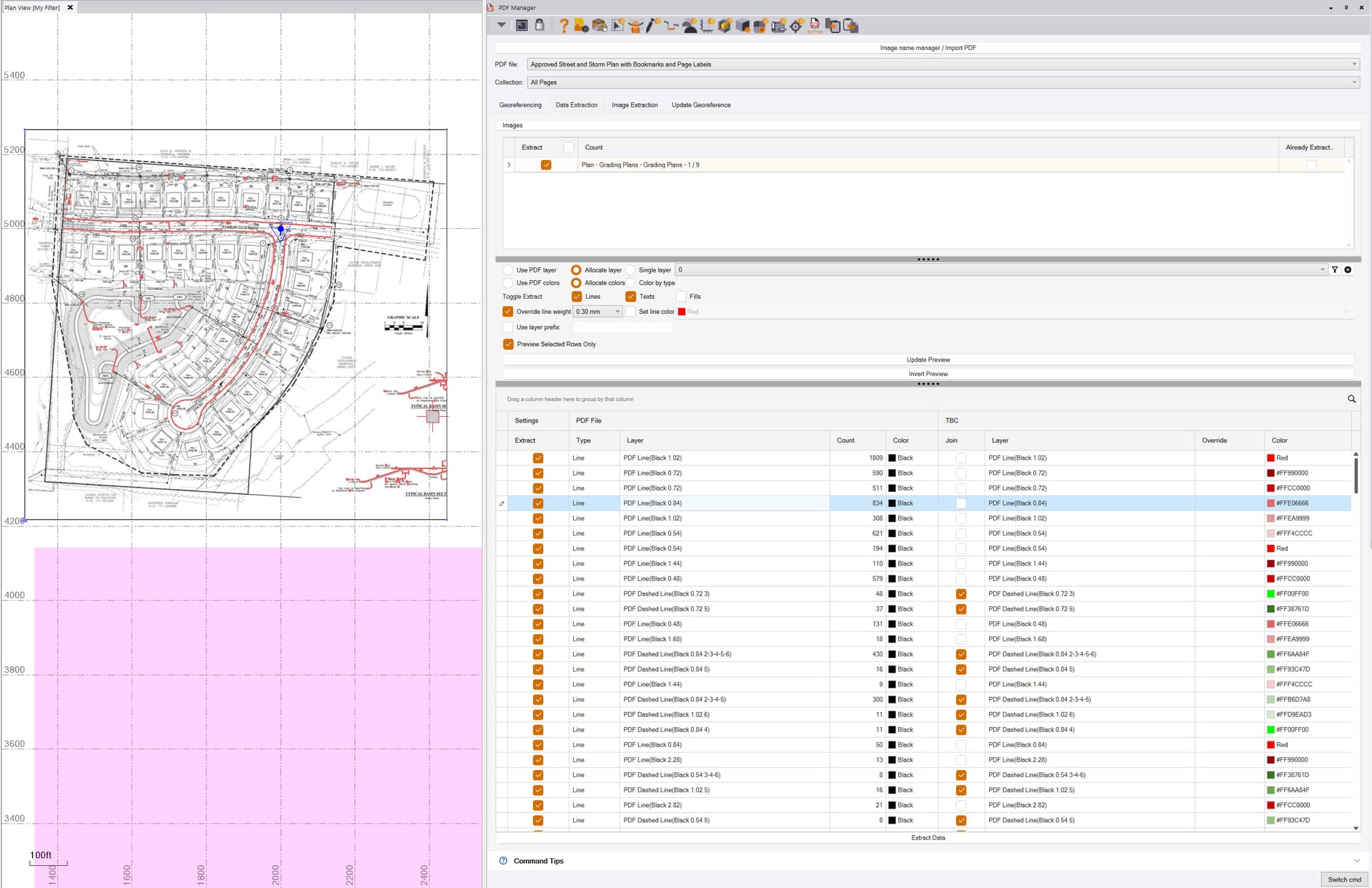
You can now preview and select what you want to extract, assign clean sets of data to your target layers directly, or place them in Layer Groups for further processing. You also have full control of what lines do / do not get joined, and what types of data that you want to extract.
Reduce unnecessary clutter in your projects and accelerate your data prep and modeling procedures.
Layer Manager Command
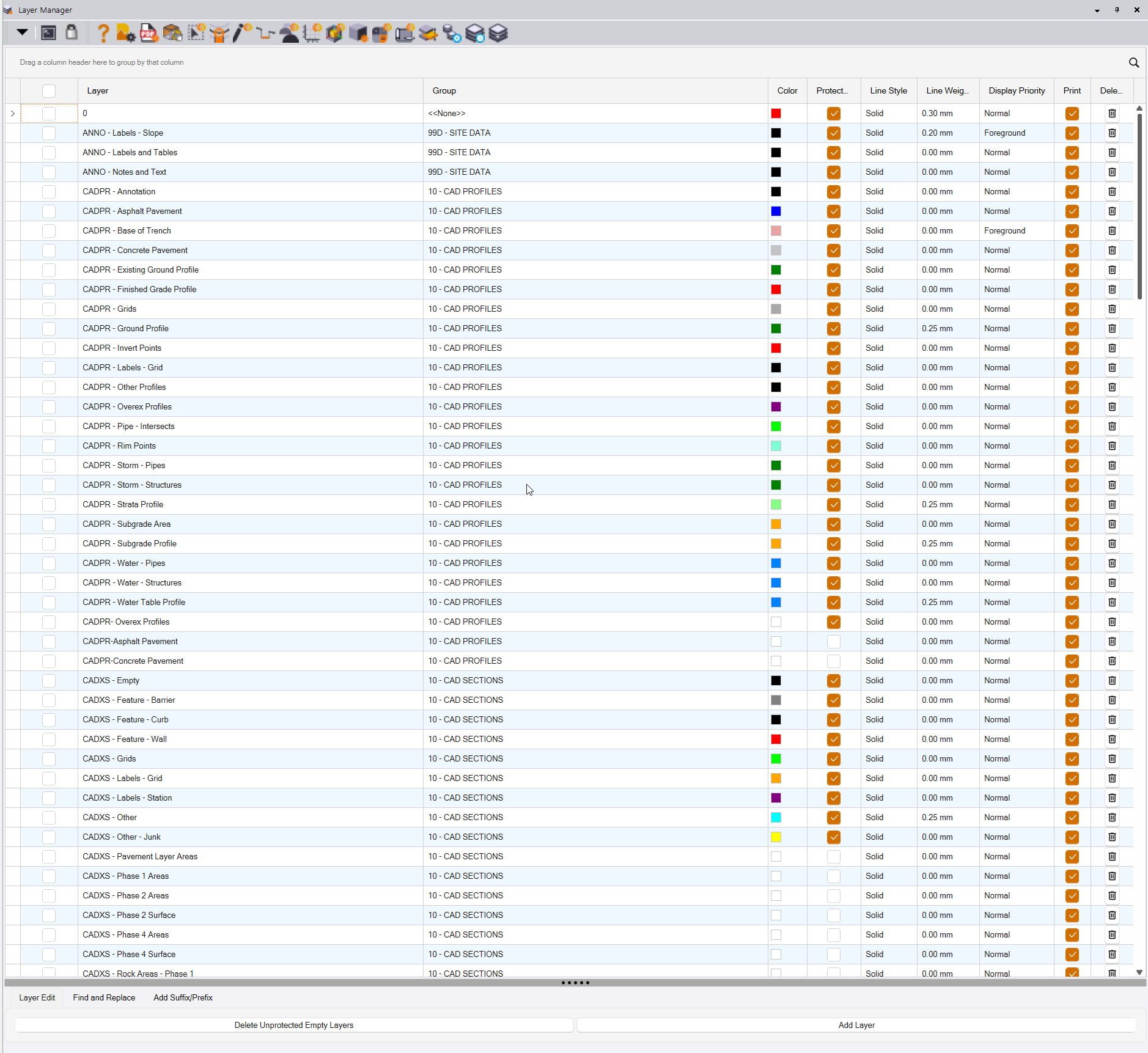
Faster, cleaner more capable layer management. Includes new color picker for greater number of standard color selection options. Organize the data as you want it - move or hide columns, filter the content, group the content, edit the content, search and replace layer and layer group names, prefix and suffix layers, remove empty unprotected layers, hide columns that you don’t need or use.
Slope Indicators
The Create Slope Indicators Command has been further enhanced for more effective use in the 3D Modeling work process, for adding supplemental linework to slope or large pavement surfaces for improved triangulation and smoother machine control surface / blade operation with less chatter.
CAD Cleanup Command
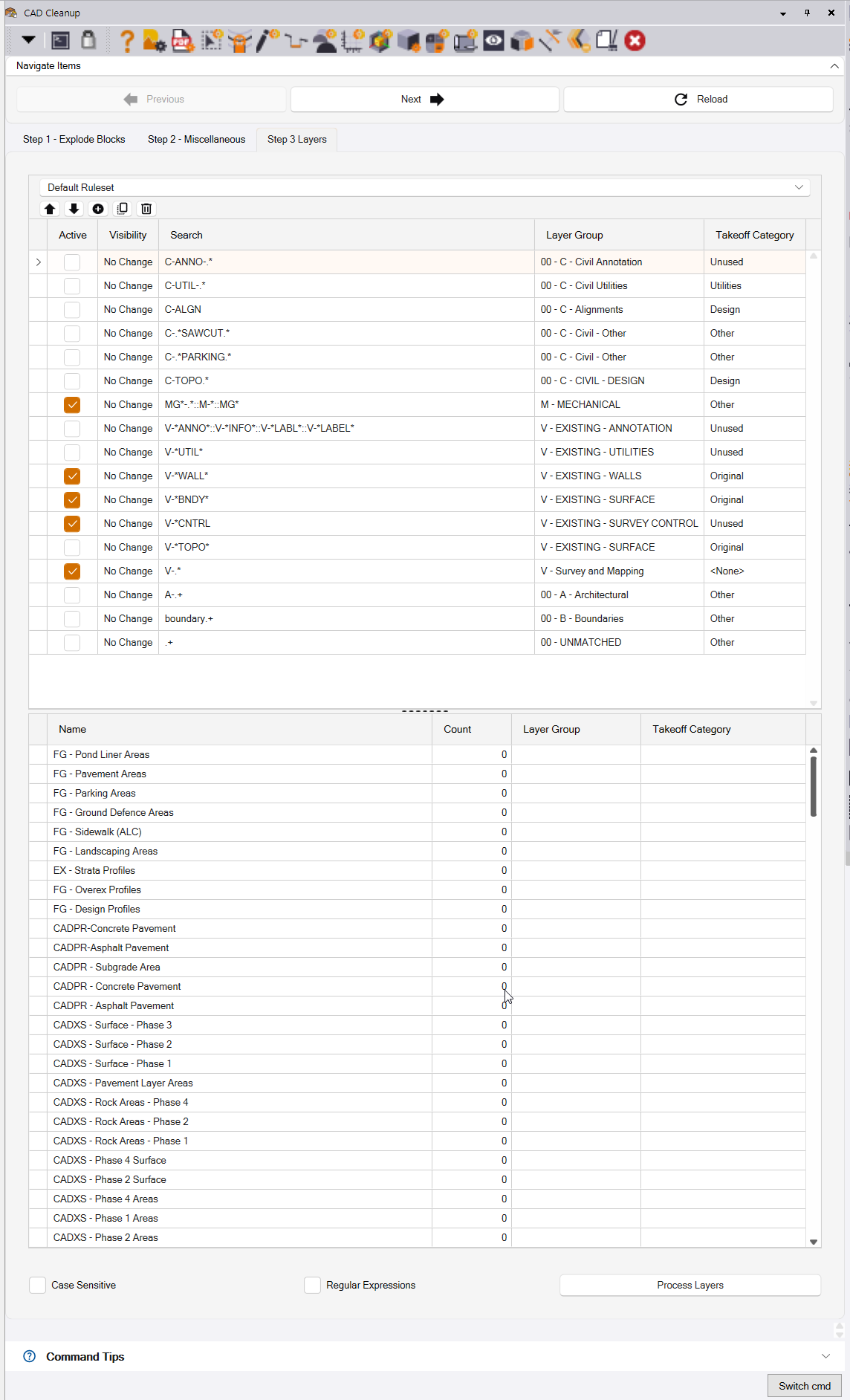
The CAD Cleanup command user interface and workflow has been enhanced using the new RPS Grid Control in the Step 1 and Step 3 process tabs. This makes it easier to edit, enter and work with data in the data grids used by the command.

Smart Edit Command
Added the ability to elevate lines by their intersection with other lines
Added the ability to use slopes in Z formula eg Z +2% to elevate one side of a sidewalk from the other at a cross slope of 2% etc.
Smart Point Manager Command
The Smart Point Manager Command has been enhanced through the addition of an additional mode - Name Points By Grid Lines - for adding Point Numbers to selected points for e.g. Drill or pile Planning purposes. The process allows the user to define a grid, match the points to Row / Column intersections, and then provides Numeric, Alphanumeric and custom point numbering options.
Cloud Services Command
Cloud Services Command Library Licensing
The Cloud Services capability will now be licensed to RPS Smart Suite as of January 1. All users with RPS All Tools Command Library will have access to Cloud Services until the end of their current subscription period (and any extension purchased before end of 2025).
Ask Rocky Improvements
The user interface for Ask Rocky has been improved significantly, allowing you to more easily track an AI script development conversation.
Lot Misclosure Reporting. Adjustment and Legal Description writer.
This tool starts out by analyzing a lot line for misclosure analysis and validation against target misclosure results. It produces a full misclosure report and labs all the segments of the lot Boundary. It supports linear and urged segments correctly.
The tool then provides 4 different methods of misclosure adjustment including Bowditch, Crandall, Compass and Least Squarss. Each method can be used stand alone, or you can run all 4 methods at the same time. EXh method generates an adjusted lot line, full lot segment labeling, full adjustment report.
The tool will also generate a legal description for the adjusted lot line to provide your cadastral / legal deliverable requirements.
You can use this fun thing in association with the surface slope analysis ommand for the area inside the lot Boundary to create a color coded map showing slope ranges across the site the ommand also generates a full excel report of the slopes and areas of rhe surface contained within each slope band.
Perpendicular To Cross Section Slope Tool
This tool will compute the cross slope of e.g. a road from 2 strings, and then offset the strings using a perpendicular offset to the cross slope between the strings at any interval ad at all critical 2D / 3D locations.
Perpendicular Surface Offset Tool
This one has been requested a lot, it is extremely hard to get right, but makes a very good solution (to a large extent) of computing an offset surface computed perpendicularly to a selected surface. It cannot handle vertical or near vertical faces, and it for sure works best with design suraces vs field measured surfaces, however it provides a good solution for offsetting surfaces like landfill cells or pond liners or embankment slopes, where the offset varies because of slope variations.
Create Coordinate Grid
This tool provides the ability to create a coordinate grid in the plan view that can be selected and exported easily with project data into DWG / DXF / DGN formats. Simply draw or select a polygonal boundary, eter your grid spacing and the command takes care of the rest. The command supports any shape of polygon from rectangles to circles to irregular shaped boundaries as needed for yor project.
Create Culvert Diagrams
This tool provides the ability to enter basic culvert properties like length, invert In and Out, Slope, road height, culvert height, embedment material depth, road width, Hinge and toe of slope offsets and computed peak flow water depths for different storm conditions, and to automatically build high quality image / drawings of the culvert that can be used on drawing sheets.
Other Improvements
All LandXML based Cloud Services have been updated to accommodate changes made to TBC LandXML exports that now support the ISO standard for Machine Control Model exchange. The uppdated LandXML exporter now exchanges data using metric units only, has a modified approach to sharing alignment data and a host of other changes. Our cloud services commands that work with surfaces (Bird Bath Analysis, Surface Area / Slope Range Analysis, Raindrop Analysis) or Alignments (Label Alignments), have now all been updated to work with the new LandXML schema based on the Inframodel Exchange Standard v1.2 that has been adopted by the ISO committee working on Mixed Fleet data exchange between manufacturers (Trimble, Topcon, Leica, Komatsu, John Deere, Caterpillar, Novatron / Moba, Infrakit.
The new standards provides all of the manufactures of Machine Control / Site Surveying Equipment a framework that allows “Server to Server” data transfer in ISO standard formats. The standard provides support for
- Surfaces
- Alignments
- On Machine Measured Point Data
- On Machine Tag File Type Data for e.g. surface updates and intelligent compaction
- Site Calibration / Coordinate System Data (The new standard utilizes a JSON version of Trimble’s DC File)
Server to Server means that anyone can now
- Write out files that can be consumed by Cloud Based Server software like Trimble’s Works Manager / Works OS platform
- Server software like Works Manager will be able to connect to Server Software of Other Manufacturer’s equipmentto deliver or retrieve model data for machines in a commonly understood and shared / open format
Trimble estimates that they will roll out their Works Manager updates including all of the collaboration workflows at ConExpo 2026 in March. This initiative is supported by all of the major players, and is a huge step forward for interoperability / mixed fleet capabiluities on jobsites.
Other Usability Improvements
Many commands have had a facelift through the implementation of our new User Interface concepts that will continue to evolve over the coming months. Major functions in this category include
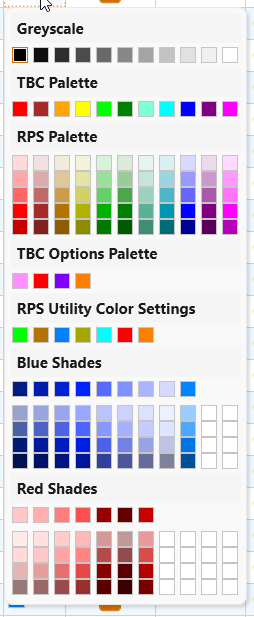
Color Picker
Our new color picker contains a selection of standard color palettes to give you direct access to a greater range of pre defind colors, and the ability to define your own color palettes through RPS Settings to meet your specific needs. The color picker has been added to a number of commands so far, and will be rolled out to all of the Smart Suite / Smart Data Prep commands over the next few months.
Improved Grid Controls
The new RPS Layer Manager shows off the new Grid Controls the best. The grid provides direct easy access to editing, entering or listing values, making it faster and easier to work with grid cell based data.
The grid columns can be organized by the user into an order that works for you using simple drag and drop techniques.
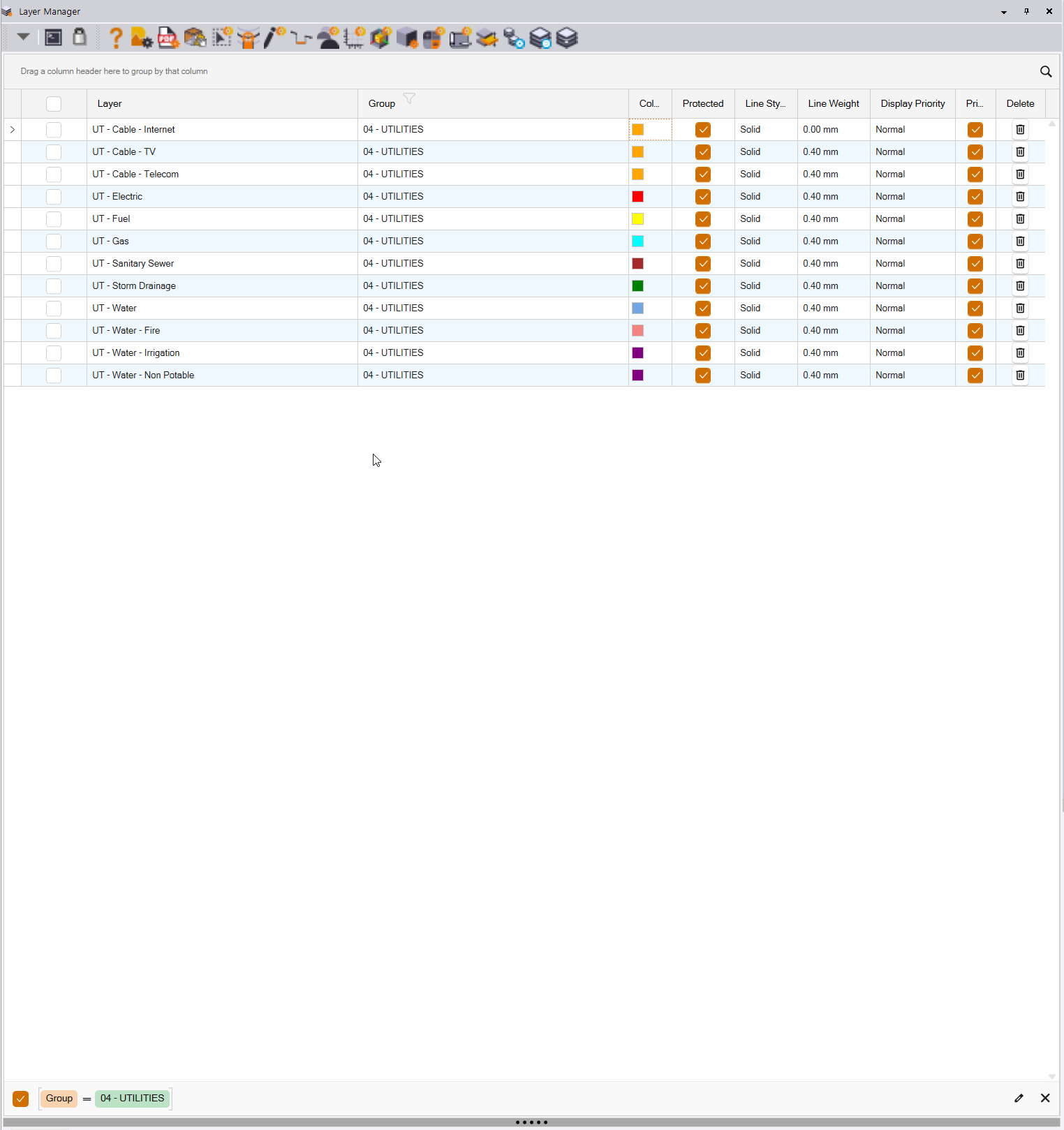
The grid columns can be sorted in ascending or descending order, and they all contain a filter that allows you to filter down the data to just what you are interested in. The image shows the new Layer Manager filtered by the 04 - Utilities layer Group - ideal for when you are working with Utilities, or Existing or Finished Grade data.
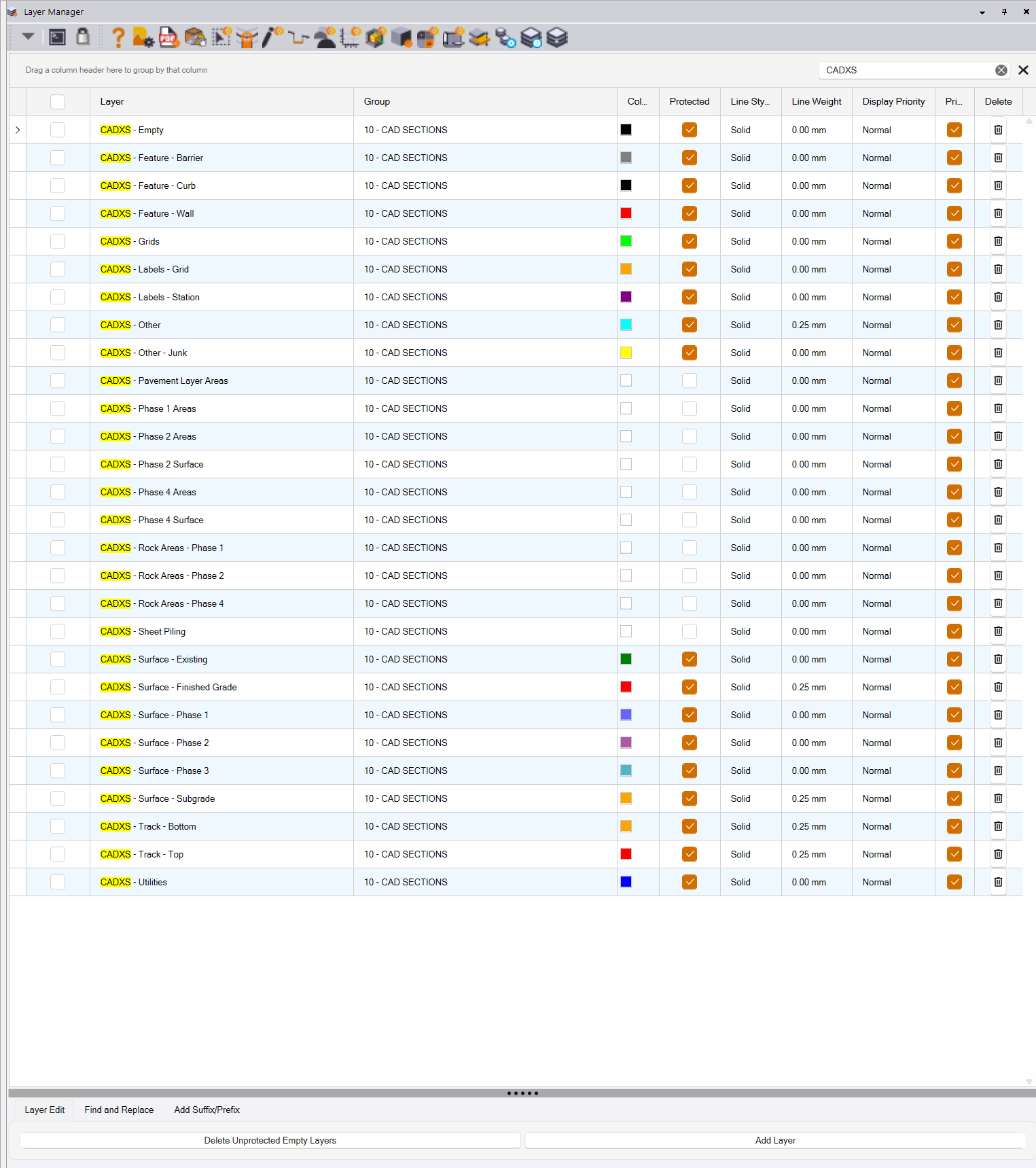
The grid has a search function that finds what you are looking for in a second, and reduces the content of the grid down to just those rows that contain the searched for character string. The image shows the Grid with a Search for CADXS that highlights where the letters CADXS are used, and filters the list down to just what you are looking for.
The grid can also be grouped based on any column header i.e. by Layer Group, by Line Weight, by Line Style, by Display Priority etc. making it easier to navigate. The groups can be expanded and collapsed, allowing you to reduce the list length to just what you are working with.
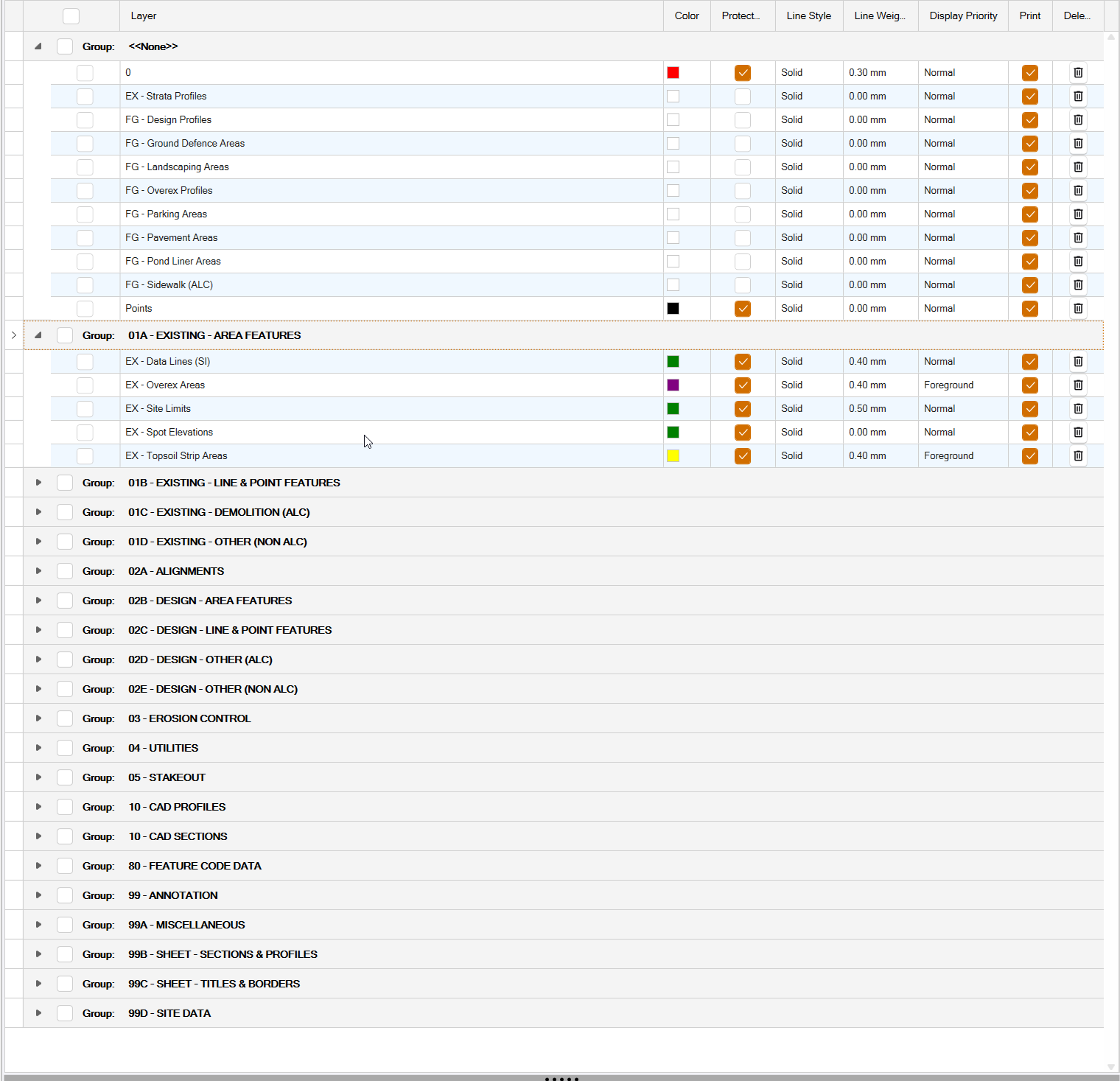
The Grid also allows you to select multiple rows and run processes on those rows e.g. to search and replace text in Layer Names, to change the Layer Group to which the layers are assigned, to Prefix or Suffix Layer names etc. You can also just click in a Layer Name cell and edit the name.
More UI Colors and Structure to Aid Understanding
We are starting to include colors, shading and clearer beaks in the dialog areas, to make the workflows and capabilities of the command more obvious and easier to follow. We plan to do a lot of work in this area along with some additional command consolidation during the early part of 2026 to further enhance the user experience.
Here is an example of the new cleaner look that we are working towards. The image shows colored check boxes, the new grid controls and an overall cleaner work process structure for the user.
Smart Properties and Dynamically Updating Spreadsheet Reports
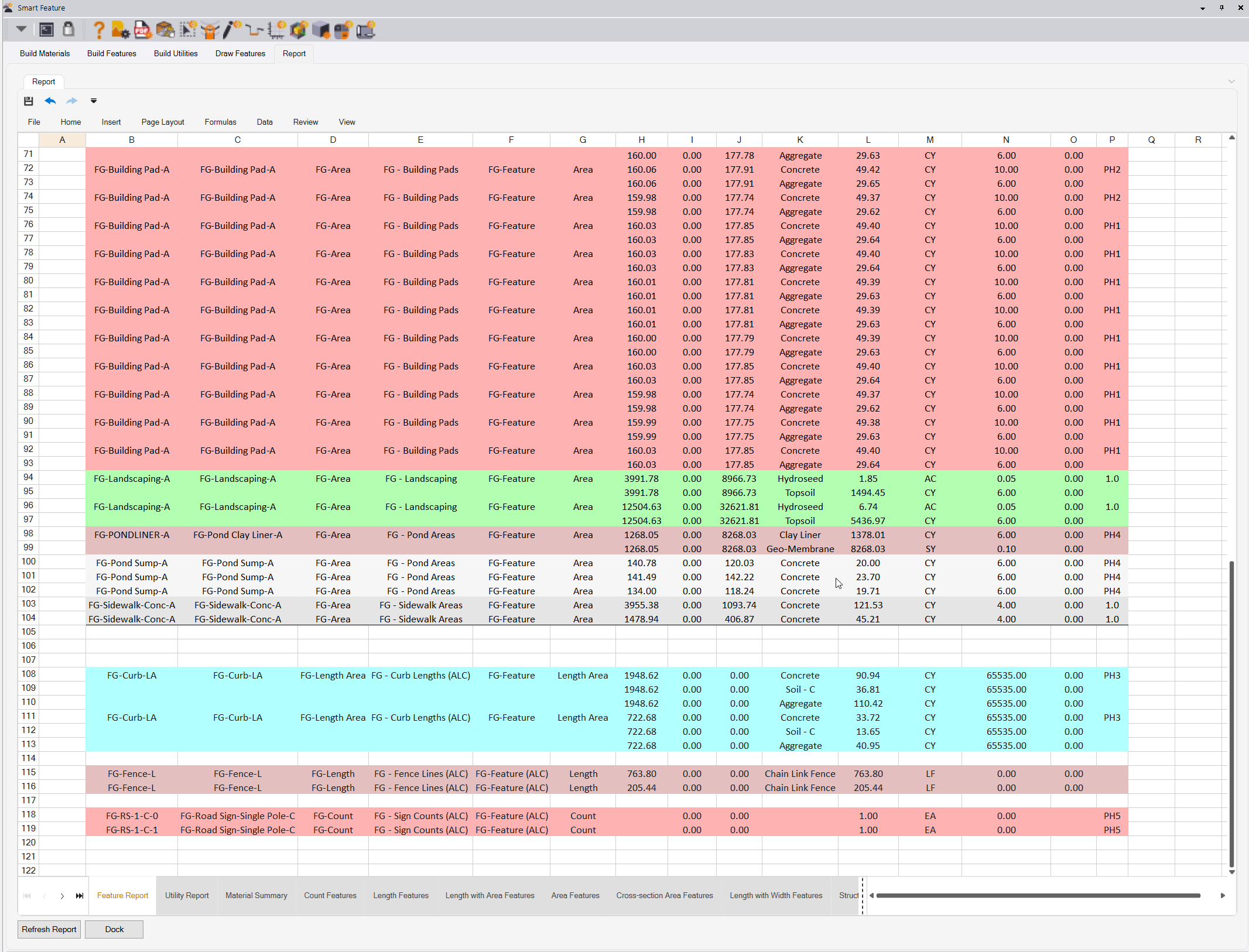
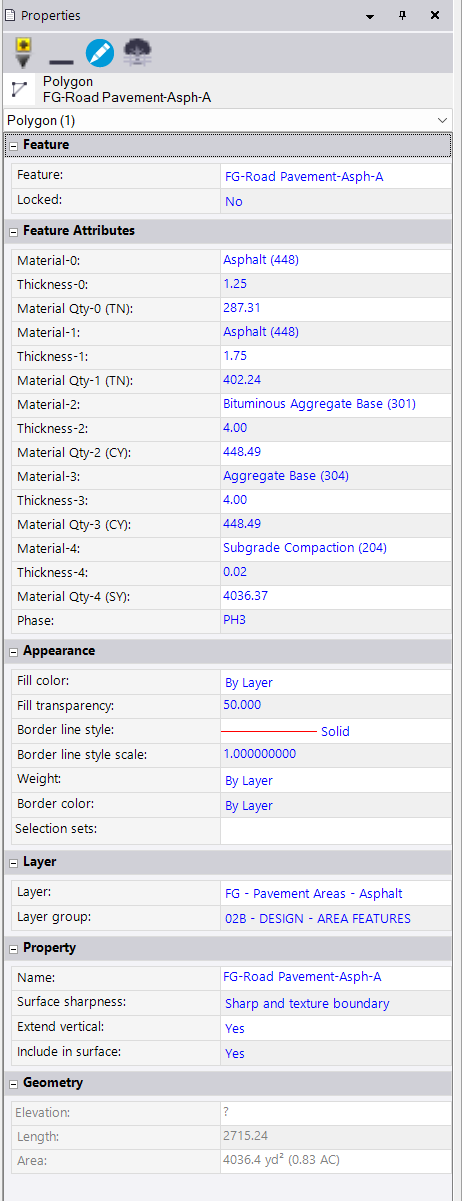
The new User Interface design also incorporates a full spreadsheet report / editor in key commands like Smart Feature, Smart Profile and Smart Takeoff. These spreadsheets are getting populated in real time as you draw or assign features to linework during a Takeoff process. The report data is dynamically linked to the feature, so that if the features length or area changes, the material quantity updates automatically. The features are also generating new Smart Attributes, that update dynamically when the feature changes, to display updated material quantities in the Properties Pane for the selected feature.
Spreadsheet Reports have multiple tabs, are color coded to match feature colors, and have full formulaic data computations, as well as charts and pivot table capability opening up a whole new world for reporting and estimating possibilities.
Smart Feature Attributes carry material quantities directly for every feature in the properties pane. Change an area, a length or a material layer thickness and the properties update dynamically.
New Packaging and Pricing for 2026
Pricing and Packaging for RPS Command Library 2026 - Overview
This release, and what we have planned for the coming months, is a massive leap for Rockpile products, and as a result we are repackaging and introducing new price points for our userbase for 2026.
Our customer base typically falls into three main categories
- Field Operations
- Data Prep and 3D Modeling
- Takeoff for Estimating (which includes Data Prep for Takeoff)
In addition, as we move more towards offering full solutions for Data Prep and Takeoff on the TBC Site and Field level of subscription, our user community can decide to carry out Data Prep and Takeoff workflows
- In the traditional TBC way (Purchase a Construction Edition Subscription)
or
- Utilize RPS Tools on the Site and Field Subscription Platform to do their Data Prep and Takeoff work
or
- Use a hybrid approach, that utilizes a mix of traditional TBC and RPS Command library workflows
As a result of “all of the above” we have developed a two tier product offering to meet these collective needs, and to charge what we consider to be reasonable and fair pricing for our solutions. This approach will set the standards that we will be adopting for the next 3 years of our evolution.
The current All Tools Command Library, Modeling and Estimating Command Library and Toolbox structure will be 100% replaced for all new orders as of January 1 2026. Anyone with an All Tools subscription, valid for any period of time as of Jan 1 2026 will have full access to the RPS Smart Suite package until their current subscription expires. You can purchase up to 3 years of new All Tools subscription at any time before Dec 31 2025. When your subscription expires, you can decide whether to continue with RPS Smart Suite or to dial back to RPS Smart Data Prep depending on your needs at that time.
Training Passes, Technical Support and Consulting Hours can still be purchased individually if needed for $895, $595 and $175/hr (Shane) or $250/hr (Alan).
Smart Trial (RPS Smart Suite, Smart Start Training and Technical Support for 3 Months) ($595) and Smart Trial Plus (including a 3 month TBC license) ($995) are also available.
Tier 1 - RPS Smart Data Prep
Smart Data Prep - Tools Only $1595
Smart Data Prep - Tools, Training Pass and Support Agreement $2495
This package is designed for use by Field Operations and Data Prep / 3D Modeling staff, and for people wanting to utilize RPS tools to support traditional TBC workflows. It contains all of the existing tools and their upgraded versions plus new tools Smart Plot and Quick Alignment.
The package no longer has access to the Cloud Services Commands.
The price point continues to offer improved capabilities at the current RPS All Tools system level and price point, but excludes the new Smart Feature, Smart Takeoff, Smart Profile and Smart Pane commands.
Tier 2 - RPS Smart Suite
Smart Suite - Tools Only $2495
Smart Suite - Tools, Training Pass and Support Agreement $2995
This package is designed for use by Data Prep / 3D Modelers and Estimators doing Takeoffs using RPS workflows that run well on top of the Site and Field subscription of TBC.
This is the “New All Tools” package, and comes with the guarantee that you will receive all currently available tools plus any that we introduce during the subscription period.
The key command differentials today include Smart Feature, Smart Takeoff, Smart Profile, Smart Pane and Cloud Services. Our primary development focus for 2026 is to continue to evolve the Smart Suite concept and to deliver compelling value for Site, Highway and Utility Contractors.